IP Score Check: What Your IP Fraud Score Means and 10 Free Tools to Check It (Tested)
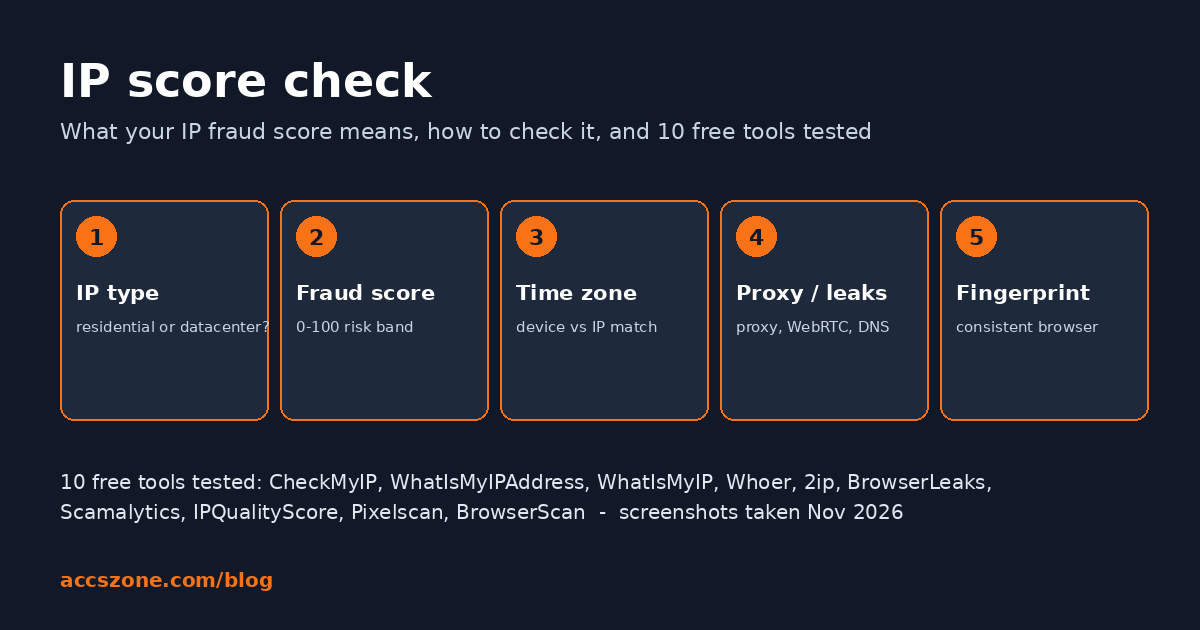
An IP score is a number, usually 0 to 100, that tells you how risky your internet connection looks to the websites you visit. Different tools call it an IP fraud score, IP quality score, IP reputation score or IP risk score; they are the same idea measured with different data. This guide explains what the score means, how to check your IP score for free, what a good score is, why a score is high, and which of the ten most-used free checkers actually shows what. We ran every tool from a deliberately bad connection (a cloud server and an automated browser) so the screenshots show you what a failing result looks like, not a marketing demo.
What is an IP score?
An IP score is a risk rating for an IP address, normally on a 0 to 100 scale, built from signals such as whether the address belongs to a hosting company or a home ISP, whether it is a known proxy, VPN or Tor exit, whether it appears on spam or abuse blacklists, and how much abusive traffic has been reported from it. Websites use it to decide how much to trust a visitor before they log in or pay.
The names overlap, so here is the vocabulary you will meet on the tools. IP fraud score is the term used by Scamalytics and IPQualityScore (IPQS) and is the most-searched version of the idea. IP quality score is IPQS's own brand and product name. IP reputation or IP reputation check is the older, email-security version of the same question, answered by blacklist services such as AbuseIPDB, Spamhaus and Talos. IP trust score and IP risk score are used by payment and anti-fraud vendors. Whichever label a tool uses, it is answering: is traffic from this address likely to be a real person on a normal connection, or an automated, anonymised or previously abusive source?
What does an IP fraud score mean?
On Scamalytics and IPQualityScore the fraud score runs from 0 (no risk signals) to 100 (almost certainly abusive), and both tools show a written band next to the number: low, medium or high risk. CheckMyIP scores in the opposite direction, 100 is best, and adds a word next to the number (ours read Fair). Read the band and the explanation, not just the number, because the scales are not interchangeable.
A score is a summary of inputs, and the inputs are what you can change. Scamalytics prints them in plain text under the bar: whether the operator is a consumer ISP or a hosting company, whether the address is a standard domestic connection, whether proxy or Tor activity has been seen, and the "true country" when the geolocation and the network disagree. IPQS lists proxy, VPN, Tor, recent abuse, bot activity and blacklist membership as separate flags. CheckMyIP splits its score into an IP reputation part and a browser reputation part and lists the issues it found. If a tool only gives you a number with no reasons, use another tool.
How do I check my IP score?
Open an IP checker that scores your own connection automatically (CheckMyIP, Whoer or BrowserScan), read the connection type and the score, then paste the displayed IP address into Scamalytics for a second opinion from a dedicated fraud database. Do this inside the exact browser profile and proxy session you are about to use, because the time zone, WebRTC and fingerprint parts of the result come from the browser, not the network.
- Find your current IP and connection type. Load CheckMyIP, WhatIsMyIP.com or WhatIsMyIPAddress. Note the ISP name and, where shown, the connection type (residential, mobile, datacenter / hosting) and the ASN.
- Get a fraud score for that IP. Paste the address into Scamalytics (no account) or IPQualityScore (free account required in our test). Write down the number and the band.
- Check the time zone and location against your device. CheckMyIP shows the IP's time zone next to your device's time zone; BrowserScan deducts points for a mismatch; Pixelscan shows a "Timezone spoofed" card.
- Run a proxy detection test and leak tests. Whoer and 2ip give a proxy yes/no; BrowserLeaks, Pixelscan, BrowserScan and CheckMyIP run WebRTC and DNS leak tests.
- Run a browser fingerprint test. Pixelscan gives a consistent / inconsistent verdict; BrowserScan gives an authenticity percentage with the deductions listed.
Repeat the same tools after any change, so you compare like with like. Every tool below is free to use for a single check; the only one that asked us to register was IPQualityScore.
What is a good IP fraud score?
Scamalytics prints a Low, Medium or High band next to its 0 to 100 number. IPQualityScore's own documentation says scores of 75 or more are suspicious and likely a proxy, VPN or Tor connection, and 90 or more are high-risk users; anything well under 75 with no proxy flag is the normal range. On CheckMyIP's reversed scale, our cloud server scored 64 out of 100 and was labelled Fair. A normal home or mobile connection with no proxy, VPN or blacklist flags lands in the lowest-risk band on all three.
Two cautions. First, a low score is not a pass if the country is wrong for the account you are logging into; score and location are separate checks. Second, scores drift: addresses are reassigned by ISPs, carrier-grade NAT puts thousands of people behind one IP, and abuse reports arrive and expire. A score you checked last month is not the score today.
Why is my IP fraud score so high?
The five causes we see most often: the address belongs to a hosting or cloud provider rather than a consumer ISP; it is a known VPN, proxy or Tor exit; it is shared by many users (carrier-grade NAT, public Wi-Fi, a busy proxy pool) and someone else abused it; it is listed on a spam or abuse blacklist; or the tool detected automation or a time-zone mismatch in your browser. The tools in this guide name which one applies.
In our test every one of those causes was visible on at least one tool. CheckMyIP and BrowserLeaks labelled the address as hosting ("Datacenter, Confidence: High" and "Usage type: Corporate / Business"). Scamalytics' text for a server address says it "is not a standard domestic connection". Pixelscan reported automated behaviour and a spoofed time zone. BrowserScan took ten points off for the time-zone difference and flagged bot detection. Only the blacklist cause was absent, because the server had never sent spam.
The 10 best free IP score checker tools, tested
CheckMyIP, WhatIsMyIPAddress, WhatIsMyIP.com, Whoer, 2ip, BrowserLeaks, Scamalytics, IPQualityScore, Pixelscan and BrowserScan. The shortest complete check is CheckMyIP for connection type, score and time zone, Scamalytics for a second fraud score, and Pixelscan or BrowserScan for the fingerprint and leak tests. None of the ten does everything on its own.
Test setup, so you can read the screenshots correctly: a Linux cloud server in the United States, a headless Chromium with a Windows Chrome user agent, system clock on UTC, no proxy. That is a datacenter IP with a mismatched time zone and an automated browser, roughly what a careless proxy setup looks like to a website. Two sites, WhatIsMyIPAddress and WhatIsMyIP.com, blocked the automated browser with a Cloudflare bot check, so those two were captured from a normal desktop Chrome on a home connection. In every image our IP, ISP and city are replaced with "masked" placeholders; layouts and verdicts are untouched.
1. CheckMyIP — IP score, connection type and time zone on one screen
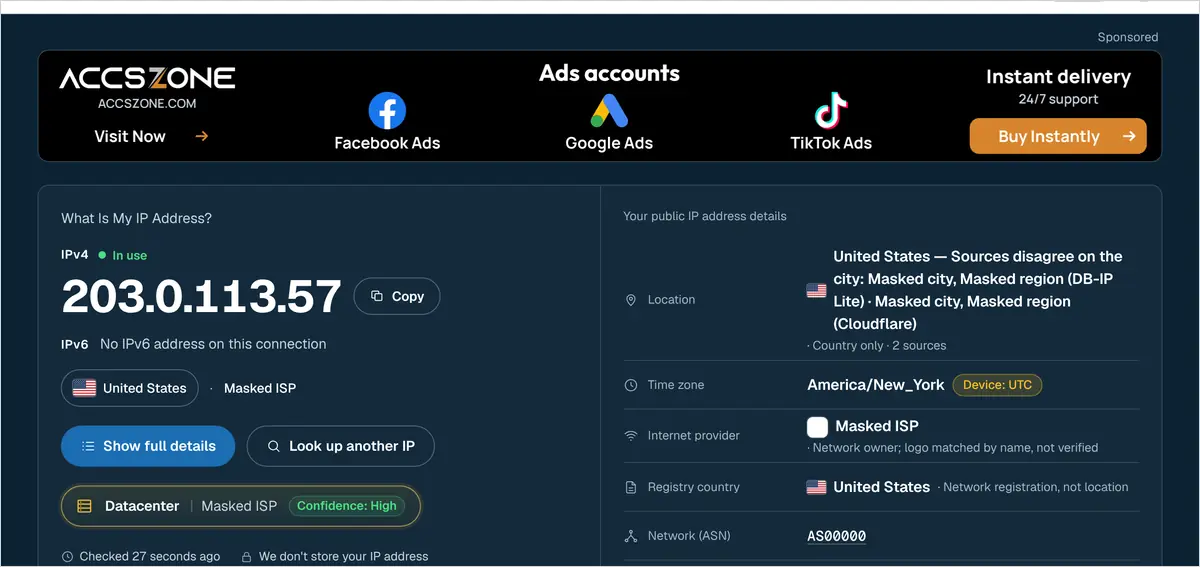
CheckMyIP is the only tool in this list that puts the connection type, the time-zone comparison and a score on the first screen without typing anything. The verdict strip under the address read Datacenter · Confidence: High, the location row said the two city databases disagreed and fell back to "country only · 2 sources", and the time-zone row showed America/New_York with an amber Device: UTC pill, the mismatch a website would also see. Further down, a reputation panel scored the session 64 out of 100, labelled Fair, split into IP reputation 60 and browser reputation 70, with a note that five issues were found and one check could not run. The site states that it does not store your IP address and that the score is an estimate from measurable signals, not a prediction of how any site will treat you.
Separate pages cover the rest: an IP fraud score lookup for any address, a proxy checker that reports proxy, VPN and Tor, WebRTC and DNS leak tests, a browser fingerprint test, an IP blacklist check and a VPN test. No sign-up and no paywall on any of them as of the test date; seven interface languages. The score is an in-house estimate rather than a licensed risk database, so treat it as the first read and confirm the IP with Scamalytics.
2. WhatIsMyIPAddress.com — the quickest "what is my IP" readout
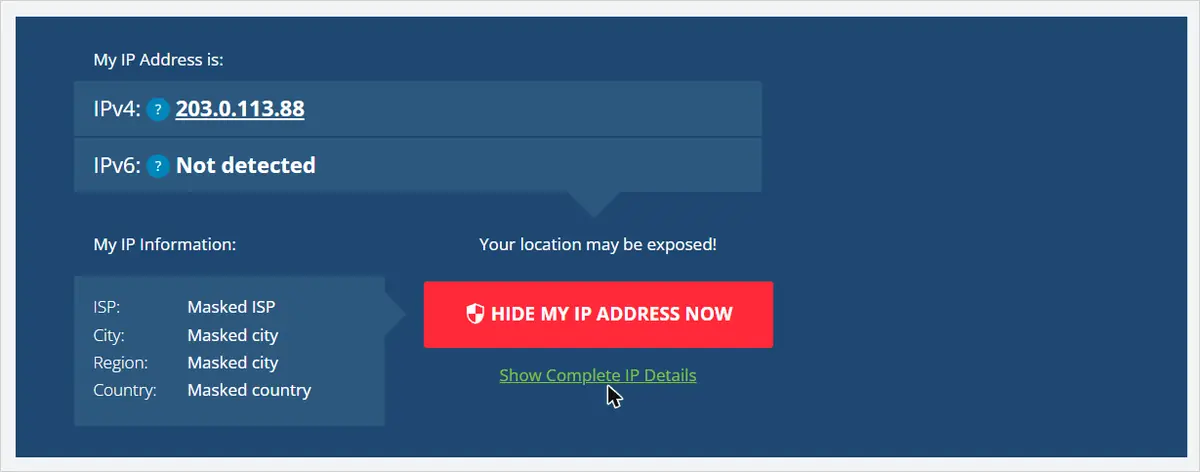
WhatIsMyIPAddress.com answers one question fast: IPv4, IPv6, ISP, city, region and country, with a map underneath. There is no connection type, score or time zone on the home page; those live on its separate tools, including an IP lookup for any address, an IP blacklist check, a proxy check and a hostname-to-IP converter. The page pushes a red "Hide my IP address now" VPN button, so for an IP score check you use it to read the ISP name and confirm the country, then move on. It is the most established site in the category, which makes it a good second source for location.
3. WhatIsMyIP.com — ISP, ASN and time zone in one panel
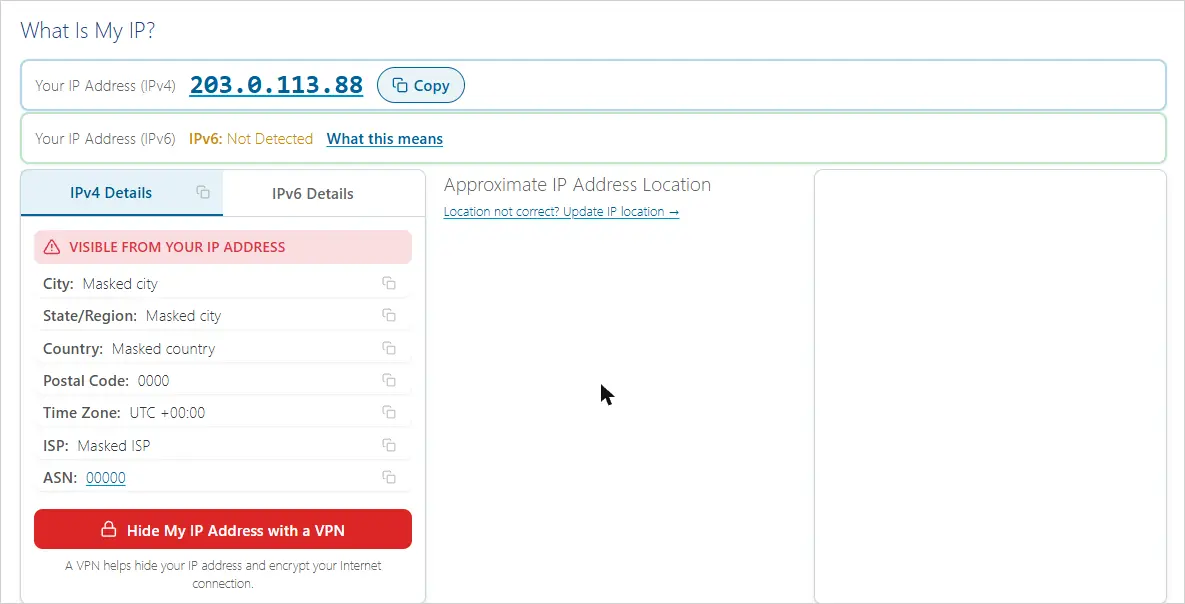
WhatIsMyIP.com shows more per screen than its rival: the red "Visible from your IP address" panel lists city, state, country, postal code, time zone, ISP and ASN together, which covers connection type (read the ISP) and time zone by eye. The IPv6 line reports "Not Detected" with a "What this means" link when your connection has no IPv6. Its other tools (IP address lookup, IP whois lookup, DNS lookup, port scanner, proxy check, user-agent viewer and a speed test) are free; the login is for the API and paid plans, not for the checks.
4. Whoer.net — proxy, anonymizer and blacklist yes/no plus a "disguise" percentage
Whoer.net is the checker most multi-account operators already know. The result card shows IP, country, ISP, DNS, hostname, OS, browser, then three yes/no rows for Proxy, Anonymizer and Blacklist, and a coloured "Your disguise" percentage. On our cloud server it reported Proxy: No, Anonymizer: No, Blacklist: No and a green 90% with "minor remarks regarding your anonymity and security". That is the limitation to understand: Whoer's headline percentage measures how well your browser hides itself, not whether the IP belongs to a hosting company, so a datacenter address with a tidy browser can score well here and badly elsewhere. The "Check fingerprint" link and the extended view give the browser detail, and there is a separate DNS leak test. Whoer also sells a VPN, proxies and its own anti-detect browser, so expect promotion around the result.
5. 2ip.io — quick anonymity card with a spam-database check
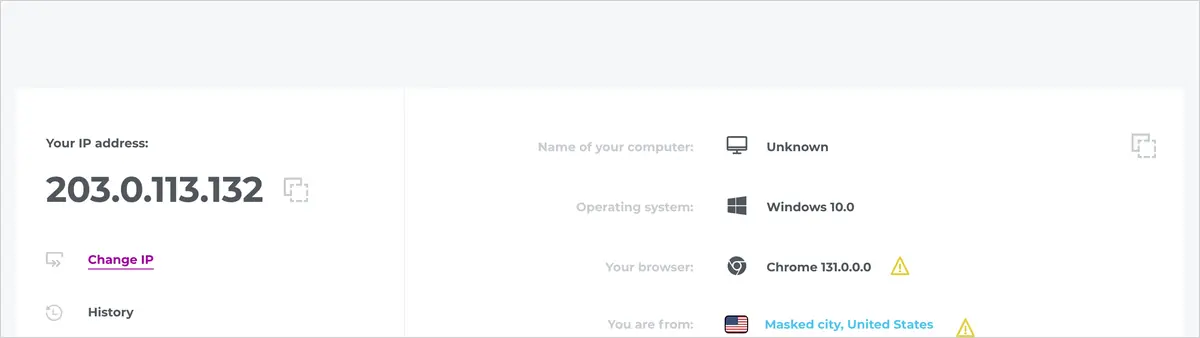
2ip.io (the international version of the long-running Russian 2ip.ru) shows IP, computer name, operating system, browser, location, ISP and proxy status, and marks rows it considers improvable with a yellow warning triangle; in our test the browser, location and proxy rows all carried one while the proxy row still read "Not used". Its value is the toolbox behind the menu: an anonymity check, an "IP in spam databases" blacklist lookup, port check, website availability, email check and websites-on-the-same-IP. If the account you are about to use was created for a Russian-speaking market, this is the checker its original owner most likely used.
6. BrowserLeaks — usage type, WebRTC, DNS and TCP/IP fingerprint on one page
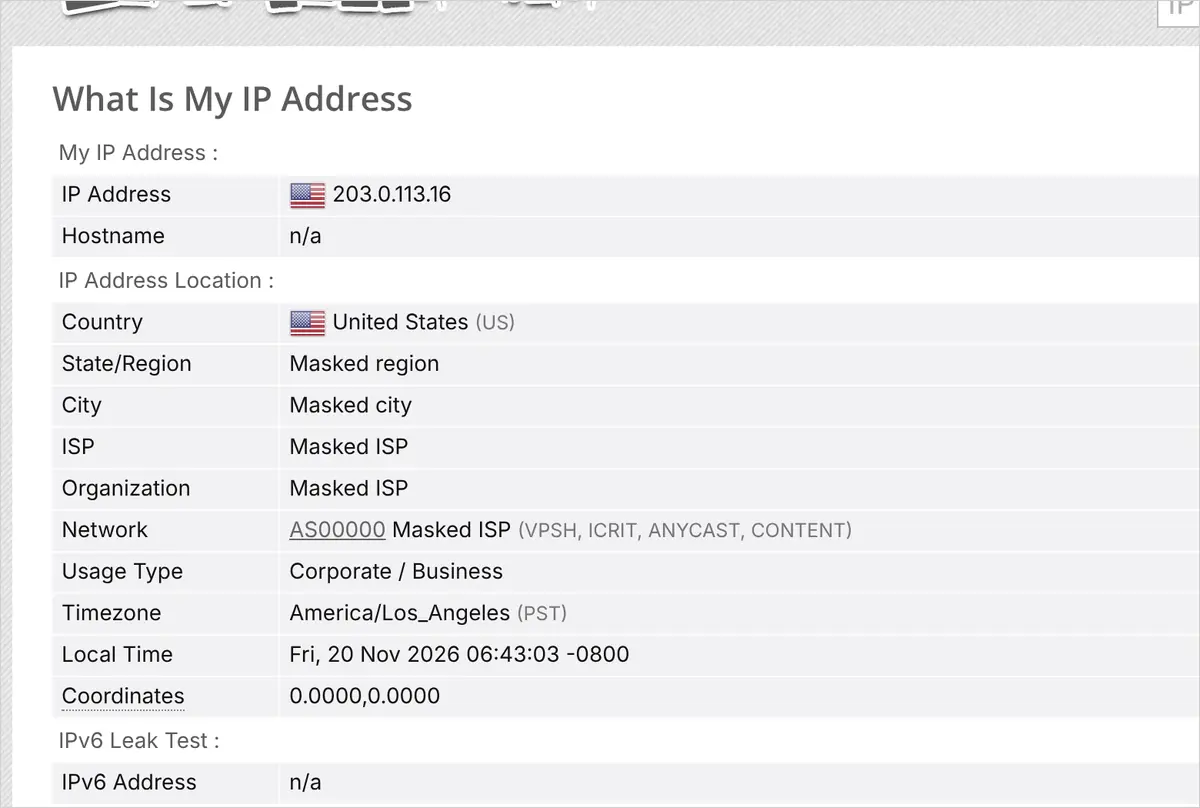
BrowserLeaks is the most technical page in the list and the one we keep open throughout a session. The IP page shows country, region, city, ISP, organisation, the ASN with its network tags, a Usage Type row (ours read "Corporate / Business"), time zone, local time and coordinates, then an IPv6 leak test, a WebRTC leak test with local and public IP rows, a DNS leak test button, a TCP/IP fingerprint and a TLS (JA4) fingerprint. The TCP/IP block exposed something no other tool mentioned: the operating system inferred from the packets was "Android" while the browser announced Windows 10, a contradiction a sophisticated site can read. Separate pages test canvas, WebGL, fonts, geolocation and JavaScript properties. No sign-up.
7. Scamalytics — the IP fraud score database most people mean
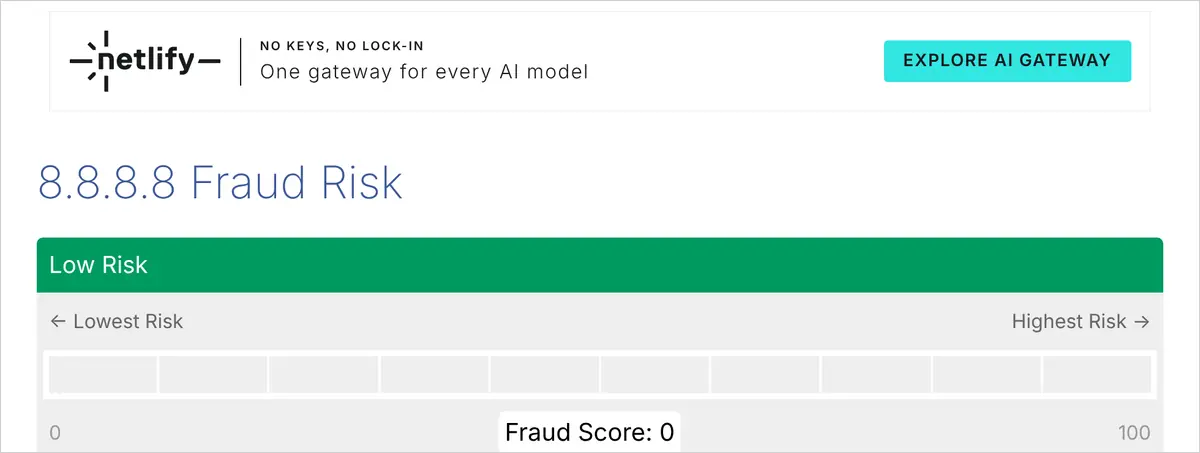
Scamalytics is a fraud-score database first and a consumer tool second: you type an IP address and get a 0 to 100 fraud score on a coloured bar, a risk band (Low, Medium, High), the operator name, and a paragraph explaining the verdict, including whether the address is "a standard domestic connection" or a commercial server, and the true country. We looked up Google's public resolver 8.8.8.8 as a neutral example; it scored 0, Low Risk, with the note that it is a commercial server which could be proxying traffic from another location. Because it scores the IP you paste rather than your live connection, pair it with any of the first six tools: read your IP there, paste it here. Single lookups on the site are free; the API and bulk files are paid.
8. IPQualityScore — the other fraud-score database (free account needed)
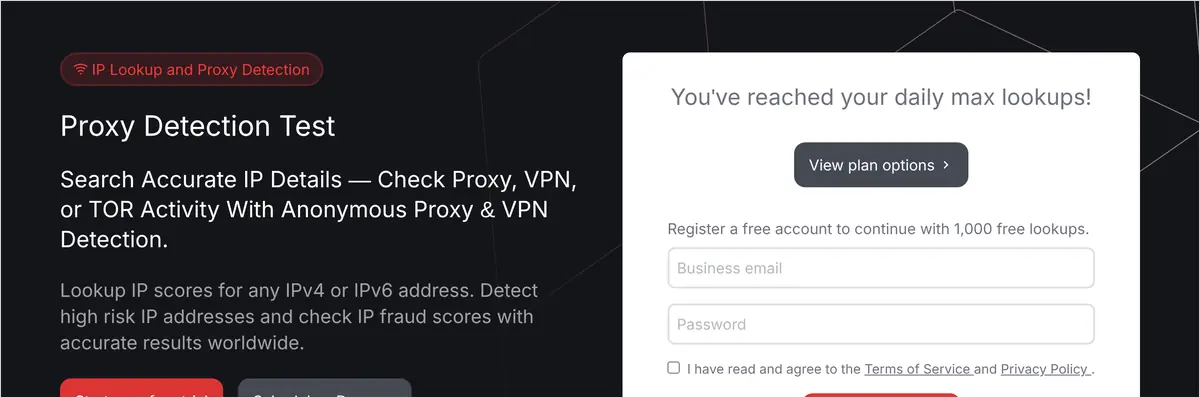
IPQualityScore (IPQS) runs the second risk database most often quoted, and its lookup page promises hostname, ISP, geolocation, ASN, time zone, an IP score and a full risk analysis including proxy, VPN and Tor detection and blacklist reports. In our test, on a fresh browser, the page immediately showed "You've reached your daily max lookups" and asked for a free account, which it says includes 1,000 lookups a month. So count IPQS as free with registration, not free anonymously. It is worth the account if you check addresses in volume, because its fraud score is the number many anti-fraud systems licence directly. On the recurring question "is IPQualityScore legit": it is an established fraud-prevention vendor whose API is used by payment and sign-up systems; the free page is a lead magnet for that product, which is why it now asks for an account.
9. Pixelscan — the browser fingerprint test with a one-word verdict
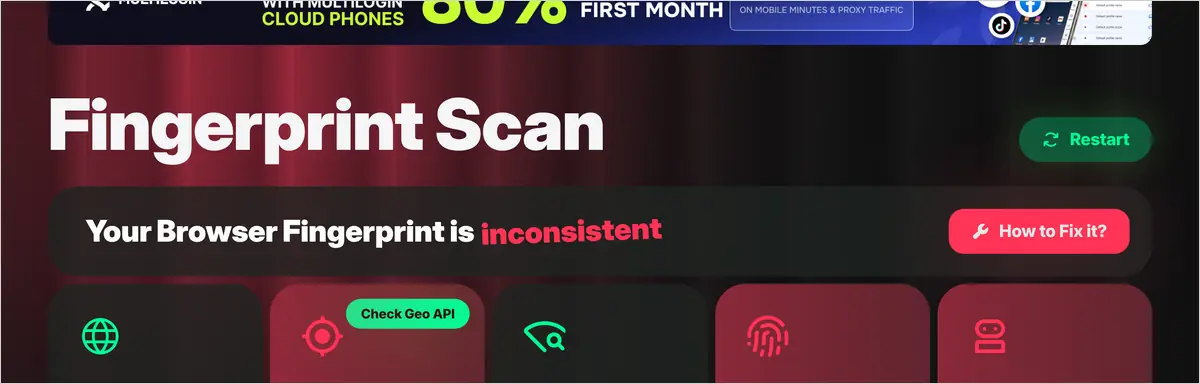
Pixelscan gives the clearest single verdict on browser fingerprint. The fingerprint check page opens with "Your Browser Fingerprint is consistent" or "inconsistent", then five cards: browser and OS, Location (with a Check Geo API button), Proxy, Fingerprint and Bot check. Our automated cloud browser produced the textbook failure: inconsistent, Timezone spoofed, No proxy detected, Masking detected and Automated behavior detected. The same site has an IP address check, IP blacklist check, bot verification, VPN check, DNS leak test, WebRTC leak test and a proxy checker app. Pixelscan is funded by anti-detect browser and proxy advertising (Multilogin and NodeMaven banners were on the page) and is the checker most anti-detect vendors tell their customers to use, so a consistent verdict here is close to the accepted bar for multi-account work. If you are choosing between those browsers, our scored comparison of Multilogin, AdsPower, Dolphin Anty and BitBrowser was tested against this page.
10. BrowserScan — IP card and fingerprint authenticity with itemised deductions
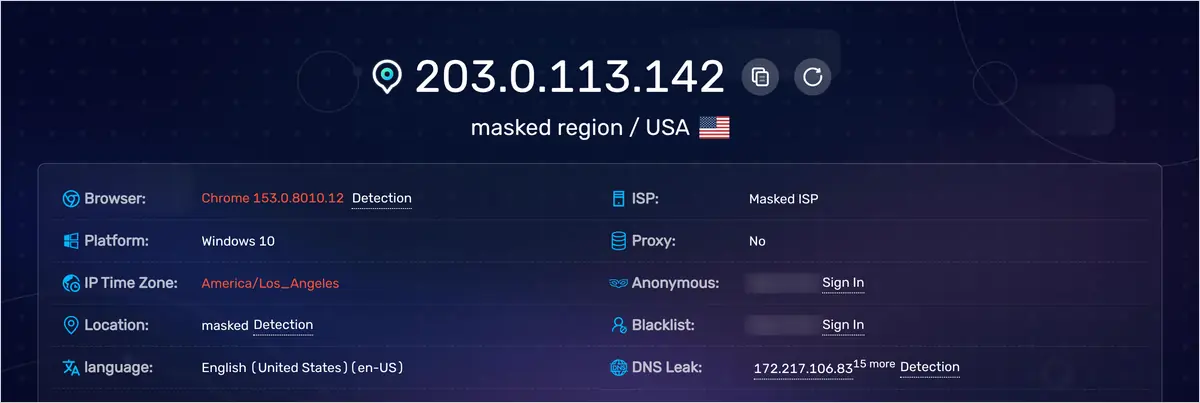
BrowserScan combines the IP card and the fingerprint verdict on one screen: IP, region, browser, platform, IP time zone, coordinates, language, postal code, ISP, proxy, DNS leak (it listed the resolver IPs it saw, with a "15 more" expander), bot detection, and a "Browser fingerprint authenticity" bar with the deductions itemised underneath. Ours read 70% with "Different time zones -10%" as the first deduction and Bot Detection: Yes. Two rows, Anonymous and Blacklist, were hidden behind a sign-in. It also has separate DNS leak, WebRTC, port scanner and user-agent pages. The itemised deductions are what make it useful: instead of a pass/fail you get the exact signal to fix.
Proxy detection test: is my proxy detected?
A proxy detection test checks whether your IP address is known as a proxy, VPN, Tor exit or hosting range, and whether your browser leaks a second address. Whoer and 2ip give a proxy yes/no on the first screen; CheckMyIP, WhatIsMyIPAddress and WhatIsMyIP.com have dedicated proxy check pages; Pixelscan shows a Proxy card; Scamalytics and IPQS report proxy and VPN flags with the score.
"Anonymous proxy detected" messages from streaming sites and games come from the same lists these tools read. If a tool says Proxy: No but the connection type says Datacenter, the site may still refuse you, because many services treat hosting ranges as proxies regardless of the flag. Residential and mobile proxies are built to avoid that label; a proxy detection test is how you confirm the one you paid for actually reads as residential.
Browser fingerprint test: does my browser look consistent?
A browser fingerprint test compares the properties your browser reports (user agent, platform, screen, fonts, canvas and WebGL output, time zone, language, automation flags) and tells you whether they agree with each other and with a normal consumer device. Pixelscan gives a consistent / inconsistent verdict, BrowserScan an authenticity percentage, Whoer a disguise percentage, BrowserLeaks the raw values page by page.
The most common failures are not exotic: a time zone that does not match the IP, a language that does not match the country, a user agent that claims one operating system while the TCP/IP or WebGL data says another, and automation signals from headless or scripted browsers. All four appeared in our test. Fixing the fingerprint usually means a browser profile built for it rather than tweaking settings in a normal browser.
IP blacklist check: is my IP listed anywhere?
An IP blacklist check looks your address up in spam and abuse databases (DNSBLs such as Spamhaus, and reporting services such as AbuseIPDB). Whoer shows Blacklist: Yes/No on the main card, 2ip has an "IP in spam databases" lookup, CheckMyIP, WhatIsMyIPAddress and Pixelscan have blacklist check pages, and BrowserScan shows the row after sign-in. A listing raises every fraud score at once.
How to lower your IP fraud score
You cannot edit the score, only its inputs. In order of effect: move from a datacenter, VPN or shared exit to a residential or mobile ISP address in the right country; stop sharing that address across many sessions; set the device time zone and language to match the IP; close WebRTC and DNS leaks so no second IP shows; use a browser profile that passes Pixelscan; and avoid addresses that are blacklisted. Re-check with the same tool after each change.
Reading the screenshots together is more useful than any single verdict. CheckMyIP and BrowserLeaks agreed the address was hosting; Whoer's 90% disguise did not contradict that, it simply was not measuring it. BrowserScan and Pixelscan both found the time-zone gap; CheckMyIP showed it as a pill rather than a penalty. Only BrowserLeaks noticed the TCP/IP operating-system mismatch. That is why this guide names at least two tools per check: one tool's green bar is not a pass.
Which IP score checker shows what? (comparison table)
| Tool | IP type / ISP / ASN | Fraud or risk score | Time-zone check | WebRTC / DNS leak | Fingerprint | Account needed |
|---|---|---|---|---|---|---|
| CheckMyIP | Yes, labelled (Datacenter / residential) with confidence | Own reputation score, 100 = best; separate IP fraud score lookup | Yes, device vs IP pill | Separate test pages | Browser reputation + fingerprint page | No |
| WhatIsMyIPAddress | ISP, city, region, country (read the ISP yourself) | No | No | No | No | No |
| WhatIsMyIP.com | ISP, ASN, postal code, location | No | Shows IP time zone (compare manually) | No (separate proxy check, DNS lookup) | User-agent page only | No |
| Whoer | ISP, DNS, hostname; proxy / anonymizer / blacklist yes-no | "Disguise" percentage (browser-focused) | Not on the main card | DNS leak test page | Yes, via Check fingerprint | No |
| 2ip | ISP, location, proxy row with warnings | No (spam-database check instead) | No | No | Anonymity check page | No |
| BrowserLeaks | ISP, organisation, ASN, usage type | No | Time zone and local time shown | Both on the same page, plus IPv6 | TCP/IP, TLS, canvas, WebGL, fonts | No |
| Scamalytics | Operator and "domestic vs commercial" verdict for any IP | Yes, 0 to 100 with risk band | No | No | No | No for single lookups |
| IPQualityScore | ISP, ASN, hostname, proxy / VPN / Tor flags | Yes, 0 to 100 | IP time zone shown | No | Separate device-fingerprinting product | Yes (free, 1,000 lookups/month) in our test |
| Pixelscan | IP address check page | No | Yes, "Timezone spoofed" card | Separate test pages | Yes, consistent / inconsistent verdict + bot check | No |
| BrowserScan | ISP, location, postal code, proxy row | Authenticity percentage with itemised deductions | Yes, scored | DNS resolvers on main page; WebRTC page | Yes, with bot detection | No, except Anonymous and Blacklist rows |
Checking your IP score before you log in to a proxied or purchased account
Run the five checks above inside the browser profile and proxy you will use for that account, before the first login and again whenever the proxy session or device changes: connection type, fraud score, country and time-zone match with the account, no WebRTC or DNS leak, consistent fingerprint. A verification prompt on first login almost always means one of those five disagreed with the account's history.
- IP type is residential or mobile, not datacenter. CheckMyIP (Traffic type), BrowserLeaks (Usage type), Scamalytics (written verdict).
- Fraud score sits in the low band. Scamalytics, IPQualityScore, CheckMyIP.
- Country and time zone match the account. CheckMyIP (Device pill), WhatIsMyIP.com (Time Zone row), BrowserScan, Pixelscan.
- No WebRTC or DNS leak. BrowserLeaks, BrowserScan, Pixelscan, CheckMyIP.
- Fingerprint reads consistent. Pixelscan, BrowserScan, Whoer, CheckMyIP.
If the account came with a 2FA secret key, generate the code only after the checks pass; a free generator such as 2fagen.com works without installing an app. If you log in and still get a challenge, the problem is usually the half of the comparison you cannot see: where and how the account was created. Why purchased Gmail accounts get banned in 48 hours walks through that side.
What these tools cannot tell you. None of them see the account's own history: which country it was created in, which devices it has seen, how long it sat idle. A clean connection in the wrong country still fails the match. When you buy an account, the seller's origin data is the other half of the check; AccsZone produces its accounts in-house on residential IPs with the registration country stated on the listing, for example in the Facebook accounts category, which is what you compare your pre-login result against. That is the one place this guide touches our own catalogue.
IP score FAQ
What is my IP score?
Your IP score is the risk rating of the public IP address you are using right now. To see it, open CheckMyIP (it scores your connection automatically, 100 = best), or copy your IP from any IP checker and paste it into Scamalytics or IPQualityScore for a 0 to 100 fraud score with a Low, Medium or High band. The number changes when your IP changes.
How do I check my IP fraud score?
Read your current IP address on CheckMyIP, WhatIsMyIP.com or WhatIsMyIPAddress, then enter it on scamalytics.com (free, no account) or ipqualityscore.com (free account required in our test). Both return a fraud score, the operator name and the reasons behind the score. Run the check inside the browser and proxy you will actually use.
What is a good IP fraud score?
On Scamalytics a Low Risk band with a score near 0 is good. IPQualityScore's documentation treats 75 or more as suspicious (likely proxy, VPN or Tor) and 90 or more as high risk, so a normal connection sits well below 75 with no proxy flag. On CheckMyIP's reversed scale, higher is better; our cloud server scored 64 out of 100, labelled Fair.
Why is my IP fraud score so high?
Usually one of five things: the address belongs to a hosting or cloud company, it is a known VPN, proxy or Tor exit, it is shared by many users and someone abused it, it is on a spam or abuse blacklist, or the checker saw automation or a time-zone mismatch in your browser. The tools in this guide name which cause applies, so you can change that input.
Is IPQualityScore legit?
Yes. IPQualityScore is an established fraud-prevention vendor whose proxy detection and fraud score API is used by payment and sign-up systems. Its free lookup page is a lead magnet for that product, which is why it now asks for a free account before showing a result; the account comes with 1,000 free lookups a month according to the page.
What does 'anonymous proxy detected' mean?
The site or app you are using has matched your IP address against a list of known proxy, VPN, Tor or hosting ranges and refused the connection. A proxy detection test on Whoer, 2ip, CheckMyIP or Pixelscan shows whether your current address carries that flag; a datacenter-type address can be refused even when the proxy flag reads No.
How do I test my browser fingerprint?
Open pixelscan.net/fingerprint-check for a consistent / inconsistent verdict with the failing items named, browserscan.net for an authenticity percentage with itemised deductions, or browserleaks.com to read every raw value (canvas, WebGL, fonts, TCP/IP, TLS). Run the test in the exact browser profile you will log in with.
Does an IP score change over time?
Yes. Scores move as abuse reports arrive and expire, as ISPs reassign addresses, and as proxy and VPN lists are updated. Carrier-grade NAT can also put thousands of people behind one address, so a mobile IP can inherit someone else's behaviour. Check again before an important login rather than relying on last month's result.
How this was tested. All ten tools were opened on 20 November 2026. Eight were loaded by an automated Chromium 131 (Windows user agent) on a Linux cloud server in the United States with the system clock on UTC and no proxy; WhatIsMyIPAddress.com and WhatIsMyIP.com served a Cloudflare bot challenge to that browser and were captured from a standard desktop Chrome on a home connection instead. Our IP address, ISP, city, region, postal code and coordinates were replaced with placeholders in the page before each screenshot; no other element was altered. Scamalytics was queried for 8.8.8.8, a public resolver, rather than for a private address. Feature lists describe what was visible on the live pages that day; tools change, so re-check before relying on a specific row.