Buy Old Gmail Accounts: What “Aged” Really Means, What You Receive, and How to Check Before You Pay
If you are searching for where to buy old Gmail accounts, you have probably already noticed that the results are a mess: forum tags, slide-deck spam and Quora threads, none of which explain what you are actually paying for. An old Gmail account is a Google account created in an earlier year that is being sold with its login, and the words sellers attach to it (aged, PVA, SMS verified, 2FA, app password, USA IP) each mean something specific. This guide explains those terms, what Google's own rules say, how to check an account before and after you pay, and how to read a listing so that the account you buy is the account you needed.
What is an old (aged) Gmail account?
An old or aged Gmail account is a Google account registered in a past year, typically 2005 to 2024, that is sold with its password and recovery details. Age is the headline feature because many platforms treat a long-standing Google account as a stronger identity than one created today. Everything else about the account (verification, 2FA, recovery email, app password, registration country) is a separate attribute that the listing should state explicitly.
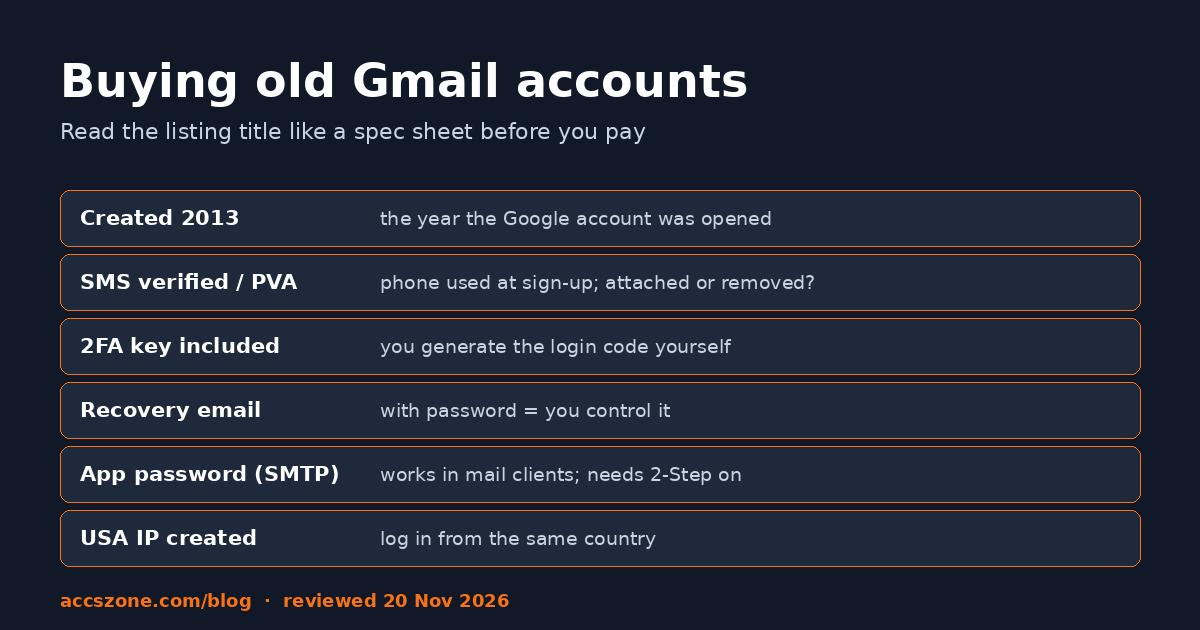
The listing title is the specification. On a well-run marketplace each title tells you the creation year or range, how the account was verified, what security is attached and where it was registered. These are the terms you will see and what they mean in practice:
- Created 2013 / Registered in 2017–2022 / Aged since 2011. The year the Google account was opened. A range means the seller mixes years inside one listing; a single year means every account in that listing was created that year.
- SMS verified / PVA (phone verified account). A phone number was used to confirm the account at creation. "No phone attached" or "phone removed" means that number is no longer on the account's security page, so it cannot be used by someone else to recover it.
- 2FA enabled / 2FA key included. 2-Step Verification is on and you receive the secret key, so you generate the six-digit code yourself (a free generator such as 2fagen.com does it without installing an app). Some listings add backup codes.
- Recovery email included, with or without password. A backup address is attached. "With password" means you also control that mailbox; "without password" means it exists but you cannot log in to it, so plan to replace it with your own.
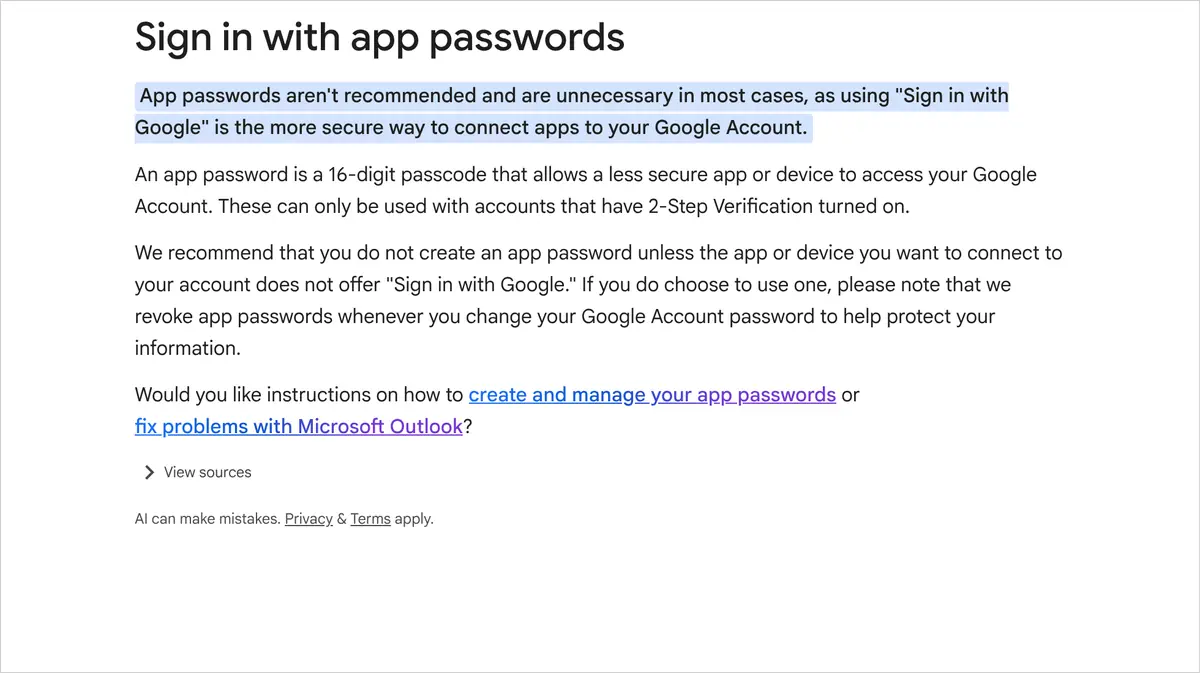
- App password enabled / SMTP ready. An app password has been generated so the account works in mail clients, SMTP senders and automation tools. Google only issues app passwords when 2-Step Verification is on (quoted below).
- USA IP created / Mixed IP created / Registered with United Kingdom. The country of the connection used at registration. Match it to where you will log in from.
- Used in some services / Requires QR scan / May require SMS confirmation. Honest warnings: the account has history on other Google services, the first login may ask for a QR confirmation in the Gmail app, or Google may request a phone confirmation. These are the lines to read twice before buying.
Old vs aged vs fresh Gmail accounts: is there a difference?
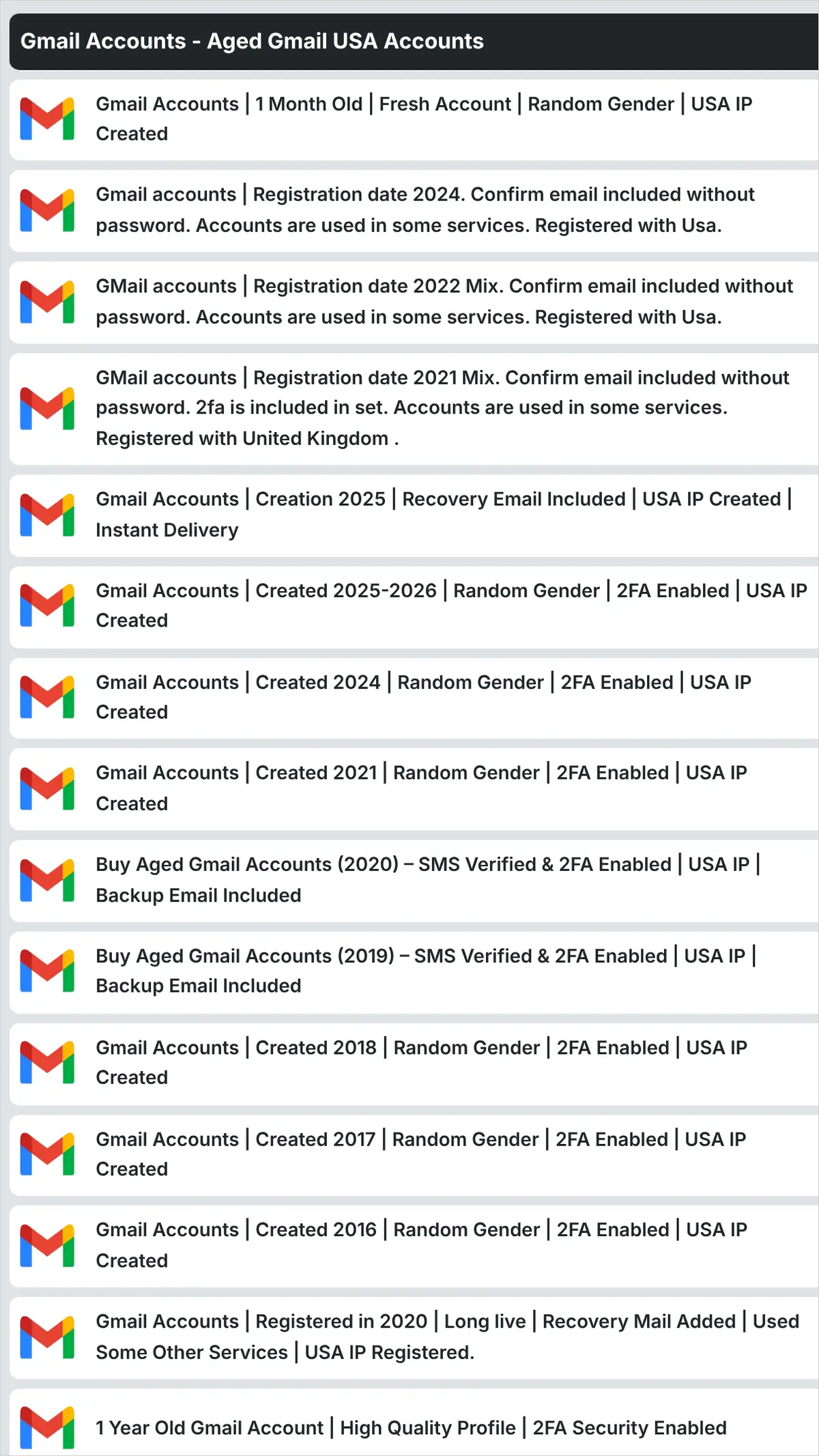
"Old" and "aged" mean the same thing: an account created in an earlier year. "Fresh" means created recently, from a few days to a few months ago. Sellers use "aged" because buyers search for it, and "old" because other buyers search for that; neither word is a quality grade. The useful questions are the year, what was done with the account since, and what is attached to it now.
One nuance matters when you compare listings. An account created in 2013 that nobody touched for a decade is not the same as one created in 2013 that has been logged into and used, because Google's inactive-account policy (below) means a truly untouched account would not exist any more. "Aged" in a live listing therefore means "created then, kept alive since", and "used in some services" is the seller telling you what "kept alive" involved.
Why do people buy old Gmail accounts?
The common reasons: signing up for platforms that trust an established Google identity more than a new one, running cold-email or transactional sending through SMTP where a brand-new address is throttled hardest, operating several business profiles that each need their own inbox, testing sign-up and login flows at scale, and starting YouTube channels on accounts that already exist. The buyer's job is to match the account's attributes to that purpose.
Which attribute matters depends on the use. For SMTP and mail tools, the app password and a recovery email you control matter more than the year. For platform sign-ups, the registration country and a clean security page matter most. For YouTube, buy the Gmail-plus-channel listings rather than a plain mailbox, because the channel history travels with the account. For bulk operations, the thing that gets accounts disabled is not the purchase but the login pattern afterwards: same device, same IP, same hour for fifty accounts. Why purchased Gmail accounts get banned in 48 hours covers that failure mode in detail.
Is it legal to buy Gmail accounts?
Buying a Gmail account is a contract question with Google, not a criminal one in most countries. Google's Terms of Service do not mention buying or selling accounts, but they do let Google "suspend or terminate your access to the services or delete your Google Account" for material or repeated breaches, and they list "creating fake accounts" as abuse. In practice: you can buy one, and Google can disable it if it decides the account breaks its rules. This is not legal advice; check your own jurisdiction for anything commercial.
What the documents actually say, so you can judge the risk yourself. Google's Terms of Service (effective 30 July 2026) prohibit "creating fake accounts or content, including fake reviews" and "spamming, hacking, or bypassing our systems or protective measures", and state that "Google may suspend or terminate your access to the services or delete your Google Account" if "you materially or repeatedly breach these terms", normally with "advance notice when reasonably possible". The Gmail Program Policies (updated 20 October 2026) add a "Circumvention" rule against "creating or using multiple accounts or other methods intended to engage in a behavior that was previously prohibited", and say plainly that "Google may disable accounts that are found to be in violation of our policies". Neither document contains the words "buy", "sell" or "transfer" in relation to accounts. The practical reading: the purchase itself is not what Google polices; the behaviour on the account is.
How much do old Gmail accounts cost?
Prices are set per listing and change with stock, so the only accurate number is the one on the listing page. What moves the price: the creation year (older costs more), whether 2FA, a recovery email you control and an app password are included, whether the account was registered from a USA or UK connection rather than mixed countries, whether it carries a YouTube channel, and quantity. A listing that bundles all of those is priced above a bare email-and-password line.
Two pricing traps. First, a very cheap "2010" account with no 2FA, no recovery email and "may require SMS confirmation" in the title can cost you more in failed logins than a dearer account with everything attached. Second, bulk quantity discounts are only worth it if your login routine can absorb the accounts gradually; buying fifty and logging into fifty on one afternoon is the fastest way to lose fifty.
What you actually receive when you buy an old Gmail account
A delivery is a text line per account, typically email:password:recovery email:2FA key and, for SMTP listings, :app password on the end. The 2FA key is the secret you paste into a code generator to get the six-digit login code; the app password is a 16-character password for mail clients and automation tools. The listing's "Delivery Format" line tells you which fields are included before you pay.
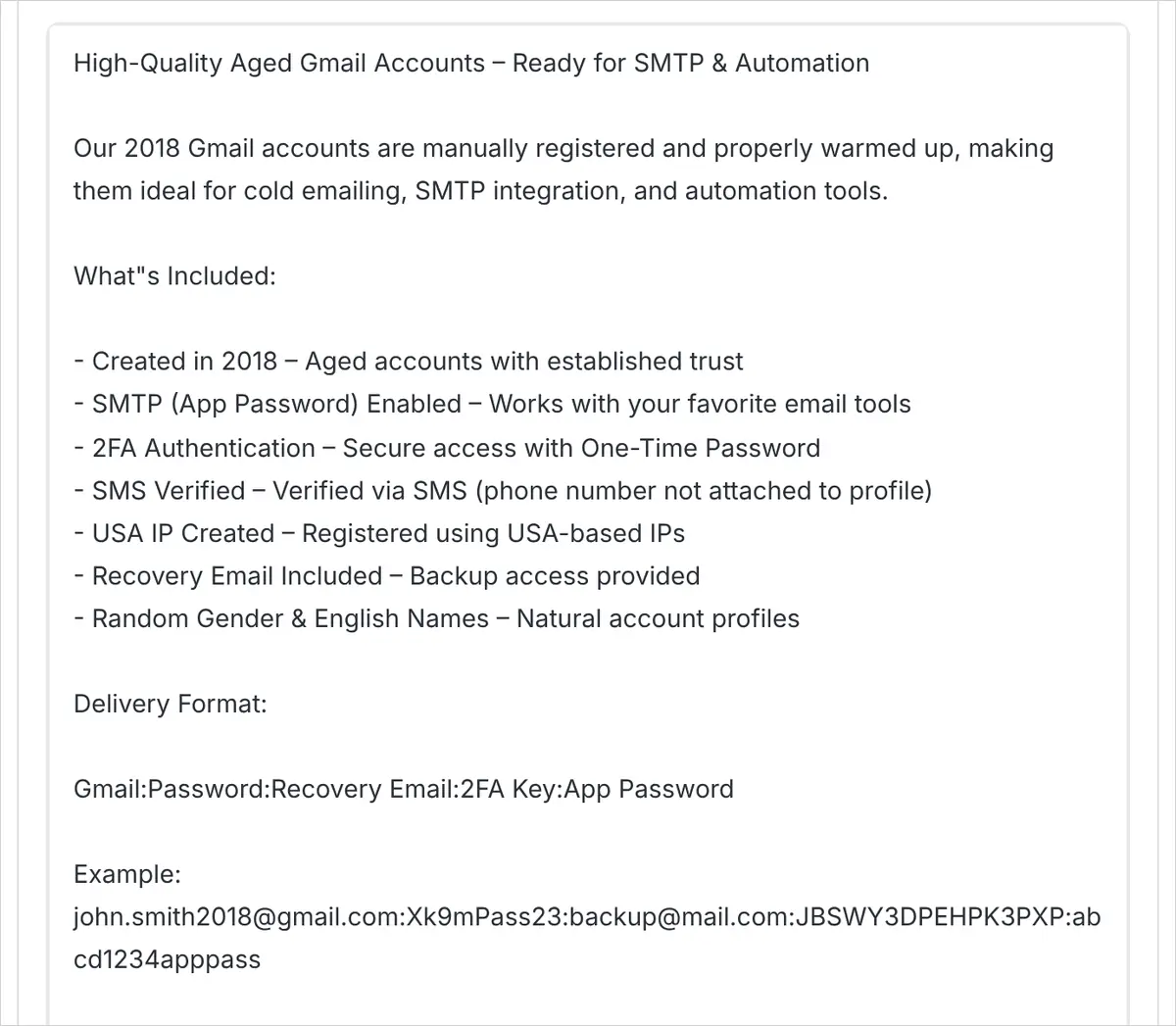
Read the format line against your use. If you need SMTP, the app password field must be there; Google's own help page states that "App passwords can only be used with accounts that have 2-Step Verification turned on", so an SMTP listing is always also a 2FA listing, and you will log in manually with the 2FA key when you need the web interface. If the recovery email is listed "without password", you can see it on the security page but cannot read its mail; treat it as something to replace with your own address after login, not as a recovery method you own.
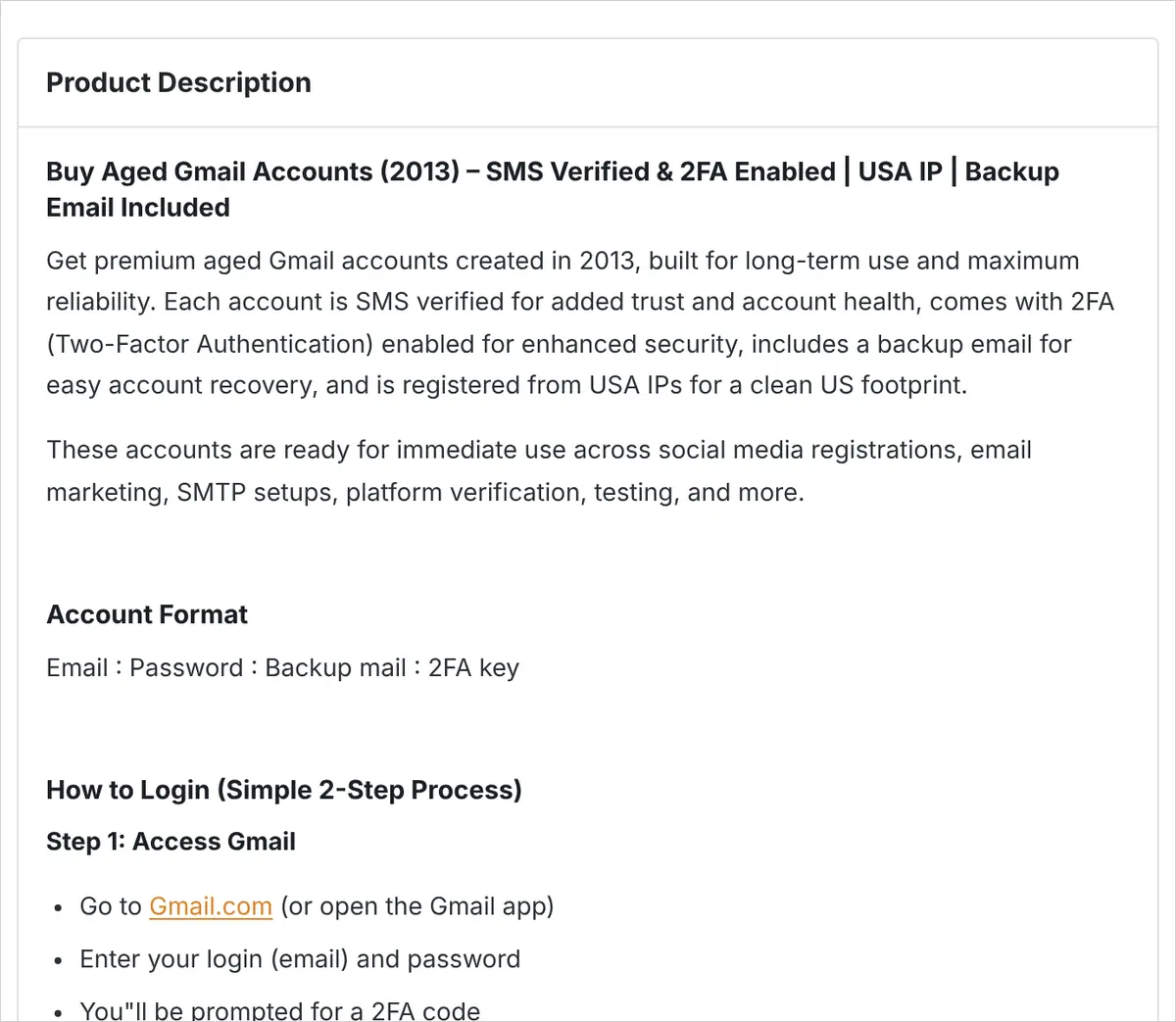
How to check an old Gmail account before and after you pay
Before paying: read the year, verification, recovery and IP lines in the title, read the delivery format, and read the replacement window. After delivery, before the first login: check your own connection with an IP checker, then log in once from the country the account was registered in, confirm the 2FA key produces a working code, open the security page to see what phone and recovery email are actually attached, and look for the oldest email in the inbox to confirm the age.
- Year and attributes in the title match what you need. Creation year or range, SMS verified, 2FA key included, recovery email (with or without password), app password if you need SMTP, registration country.
- Warnings read and accepted. "Used in some services", "requires QR scan", "may require SMS confirmation" are disclosures, not marketing; decide before buying whether your workflow can handle them.
- Replacement window understood. Most marketplaces only replace an account that fails before your first login, inside a fixed window. Test immediately after delivery, not next week.
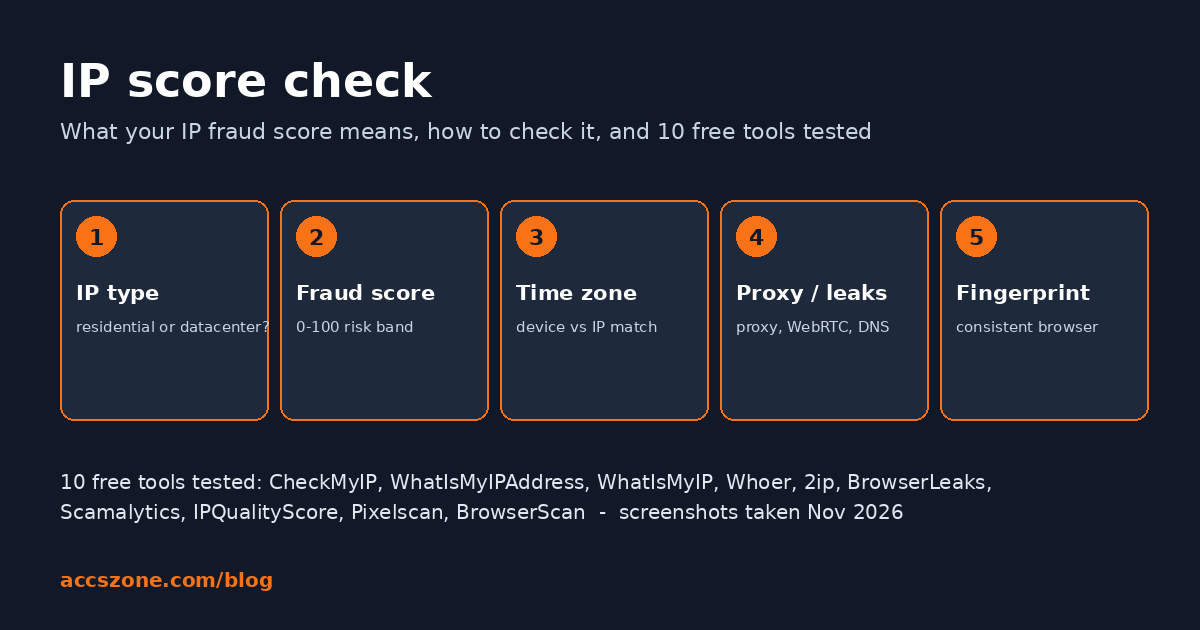
- Your connection checked first. Run the login from a residential or mobile IP in the account's registration country, with the device time zone matching. Our IP score check guide shows the free tools and what a failing result looks like.
- First login done once, cleanly. Email, password, then the 2FA code from the key. Do not change the password, recovery email and phone all in the first minute; make one change per session over a few days.
- Security page reviewed. Google Account → Security: confirm 2-Step Verification is on, see which recovery phone and email are attached, and remove anything you do not control once the account has settled.
- Age confirmed from the inbox. Sort the inbox to the oldest message or search for the Gmail team's welcome email; its date is the simplest evidence of when the account was created.
How old is my Gmail account? (how to check the creation date)
Google does not show an account creation date on the Google Account page. The quickest reliable check is the inbox itself: scroll to the last page of All Mail or search for the automatic welcome message Google sends to every new address; its timestamp is the account's first day. On a purchased account, compare that date with the year in the listing title before you accept the delivery as correct.
Can I create 100 Google accounts myself instead?
Google does not publish a number of accounts one person may hold, but it does publish the two things that stop mass creation in practice: a minimum age ("for all countries not listed below, 13 is the minimum age to manage your own Google Account") and phone verification at sign-up, which limits how many accounts one number will confirm. The Gmail Program Policies also treat "creating or using multiple accounts" to repeat a prohibited behaviour as a violation that can disable the accounts.
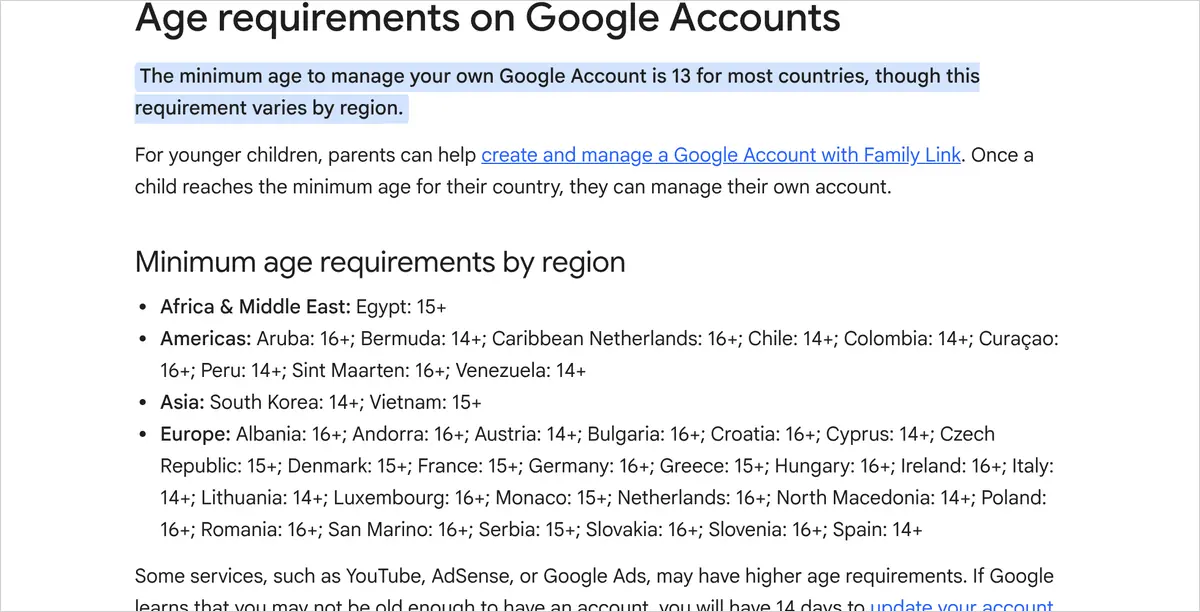
This is why aged accounts exist as a product at all: creating many accounts today means many phone verifications, many clean connections and months of waiting before the accounts look established, and a buyer with a legitimate multi-account business usually finds it cheaper to buy accounts that already have that history than to manufacture it. The same policy page is also why you should keep purchased accounts active: Google's inactive-account policy defines an inactive account as one "that has not been used within a 2-year period" and reserves the right to delete it along with its data, so an account bought and left in a spreadsheet is a wasting asset.
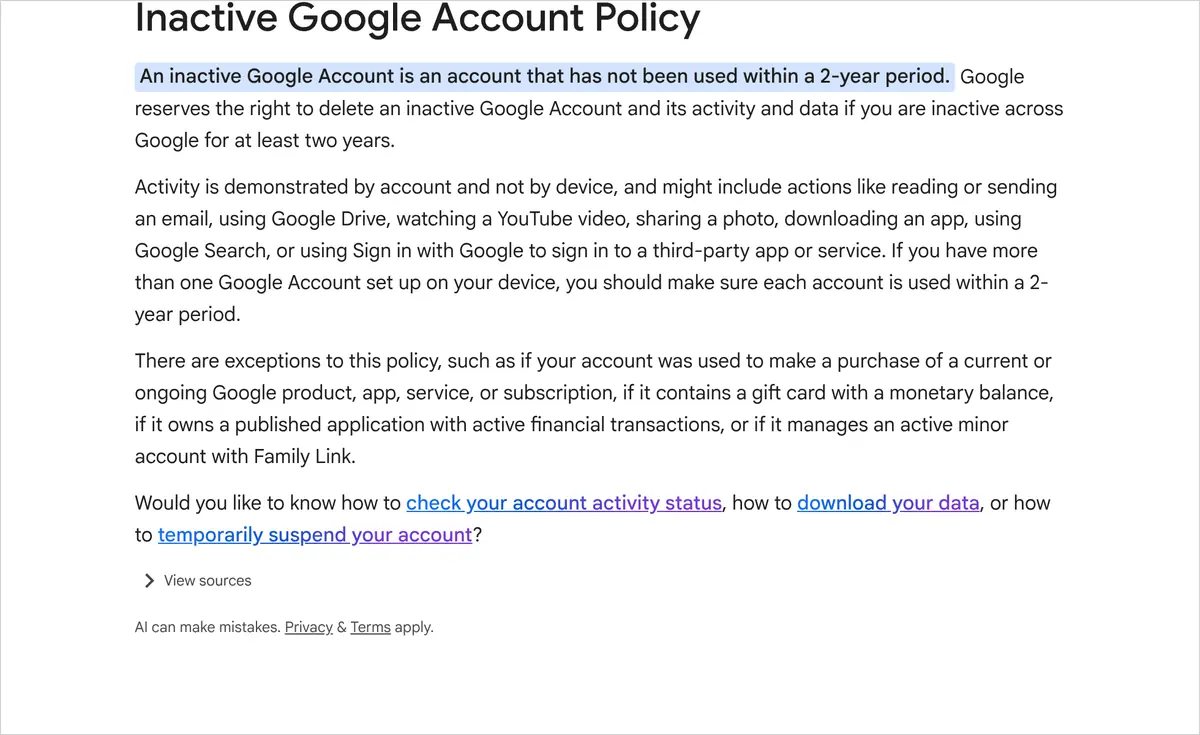
Where to buy old Gmail accounts safely: the vendor checklist
Judge a seller by what it discloses, not by what it promises. A safe listing states the creation year, the verification method, what security and recovery items are included, the registration country and the exact delivery format; the shop shows live stock, delivers automatically to your dashboard, publishes a replacement policy with a time window, and has a support channel that answers. Avoid any seller who will not tell you the year or the format before payment.
AccsZone is the worked example because its Gmail category is built around exactly those disclosures. The Buy Gmail Accounts category holds 185 listings sorted into five sub-categories (new accounts, aged USA accounts, aged mixed-country accounts, SMTP app-password accounts and YouTube-channel accounts), the registration year, SMS verification, 2FA, recovery email and registration IP are in every listing title, stock and price are live, delivery is automatic to your dashboard after a crypto payment, and accounts that fail before the first login are covered by a 24-hour replacement policy. The aged USA sub-category runs from 2003 to 2024, mostly as single-year listings, which lets you buy the specific vintage a project needs instead of a mixed bag.
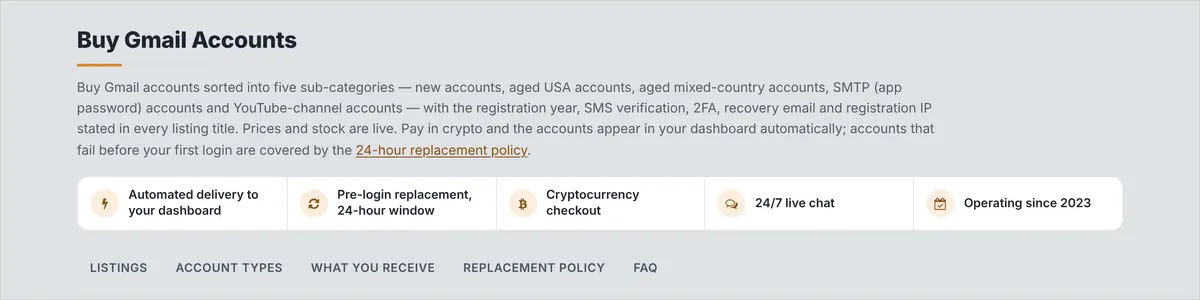
How to keep an old Gmail account alive after purchase
Keep the login pattern boring and consistent: one browser profile and one residential or mobile IP per account, in the registration country, with the device time zone matching. Change recovery details one step at a time, keep 2-Step Verification on, send and read mail at a human pace, and log in at least every few months so the account never approaches Google's two-year inactivity threshold.
Sending limits are the other place new owners get hurt. Google's Gmail help says only that "Gmail limits the number of emails you can send or get per day" and describes the error you see after "more than 500 emails sent in a day" or a message to "more than 500 recipients"; it does not promise that an old account gets more. Treat an aged account as a trusted identity, not as a bulk sender, and warm any SMTP use up gradually. If you manage several accounts, our scored comparison of anti-detect browsers covers the profile-per-account setup.
Old Gmail accounts FAQ
Is it legal to buy Gmail accounts?
In most countries buying an account is not a crime, but it is governed by Google's Terms of Service, which do not mention buying or selling and do allow Google to suspend or delete accounts for breaches such as creating fake accounts or bypassing its systems. The practical risk is account disablement, not prosecution. This is not legal advice; check your own jurisdiction for commercial use.
How much do old Gmail accounts cost?
Prices are per listing and change with stock, so read the live listing. The price rises with the creation year, with 2FA, a recovery email you control and an app password included, with USA or UK registration rather than mixed countries, and with an attached YouTube channel. Bare email-and-password lines are the cheapest and the most likely to need extra verification at login.
What is a PVA Gmail account?
PVA means phone verified account: a phone number was used to confirm the Gmail account when it was created. Listings add whether that number is still attached (“no phone attached” or “phone removed” means it is not), which matters because a phone still on the account can be used to recover it by whoever holds that number.
What is the difference between aged and old Gmail accounts?
Nothing. Both words mean a Google account created in an earlier year; sellers use both because buyers search for both. The details that actually differ between listings are the creation year, whether the account has been used on other services, what verification and recovery items are attached, and the registration country.
Can I buy Gmail accounts in bulk?
Yes; listings show live stock and a quantity field, and delivery is a line per account. The constraint is not the purchase but the logins: fifty accounts opened from one device and IP in one afternoon will trip Google's checks. Spread first logins over days, use one browser profile and one residential or mobile IP per account, and keep the device time zone matched to the account's country.
Do I need a proxy to use old Gmail accounts?
If you log in to one account from your own home connection in the right country, no. If you run several accounts, or the account was registered in a country you are not in, you need a residential or mobile IP in that country for each account, plus a separate browser profile, so that each account keeps a consistent location and device history.
How do I log in with the 2FA key I received?
Enter the email and password at gmail.com, and when Google asks for the 6-digit code, paste the 2FA secret key into a TOTP generator such as 2fagen.com and type the code it shows. Keep the key: you will need it every time, unless you later replace 2-Step Verification with a method you control.
How old is my Gmail account?
Google does not display a creation date in account settings. Open the inbox, go to the last page of All Mail or search for Google's automatic welcome email, and read its date; that is the day the account was created. On a purchased account, compare it with the year in the listing title.
Sources and method. Google Terms of Service (policies.google.com/terms, effective 30 July 2026); Gmail Program Policies (support.google.com/mail/answer/16734397, updated 20 October 2026); Age requirements on Google Accounts (support.google.com/accounts/answer/1350409); Inactive Google Account Policy (support.google.com/accounts/answer/12418290); Sign in with app passwords (support.google.com/accounts/answer/185833); Limits for sending and getting mail (support.google.com/mail/answer/22839). All read on 20 November 2026; quotations are verbatim. Catalogue screenshots are of the public AccsZone Gmail category and two listing pages on the same date; no customer data or logged-in screens appear. No prices are quoted in this article because they change with stock.