How to Buy Telegram Accounts in 2026: Top 5 Marketplaces, Portable Guide & Setup
Telegram has grown into one of the most important platforms on the internet — over 1 billion monthly active users, the backbone of crypto communities, the home of channels with millions of subscribers, and an essential tool for marketers, traders, community managers, and businesses worldwide. With that scale comes a clear demand: people need multiple Telegram accounts, aged accounts that bypass spam limits, and accounts that are ready to use the moment they are purchased.
This guide covers two things most articles separate. First, the practical side of running Telegram at scale — including Telegram Portable, the version that lets you run multiple independent accounts on one computer. Second, the marketplace side — where to buy Telegram accounts safely, the top 5 marketplaces compared honestly, what each account type costs, and how to set up purchased accounts so they survive. Whether you need one aged account or five hundred, this is the complete operational picture going into 2026.
Why People Buy Telegram Accounts
Telegram applies restrictions to new accounts that make them frustrating to use for anything beyond personal messaging. A freshly created account cannot send messages to people who have not added it first, faces limits on how many groups and channels it can join per day, gets flagged quickly if it sends bulk messages, and frequently runs into the dreaded "this action was limited" wall. These spam restrictions ease over time as an account ages and behaves naturally — but that takes weeks or months.
Buying an established account skips that waiting period. Here are the most common legitimate reasons operators buy Telegram accounts:
Community and channel management. Running multiple Telegram channels or groups requires admin accounts. Managing them all from a single personal account is a single point of failure — if that account is limited, every channel loses its admin. Distributing admin roles across multiple accounts protects the operation.
Marketing and outreach. Telegram is a primary channel for crypto projects, e-commerce, and digital services. Reaching prospects, posting in groups, and running outreach campaigns at scale requires multiple accounts to distribute activity and avoid limits on any single account.
Crypto and trading communities. Many trading signal groups, airdrops, and crypto communities require established accounts. Aged accounts with history are trusted faster and are less likely to be flagged when joining many groups quickly.
Business and client separation. Agencies managing Telegram presences for multiple clients need isolated accounts per client to keep communications and identities separate.
Geographic targeting. Accounts registered with phone numbers from specific countries perform better when targeting audiences in those regions. A business targeting Indonesian or Vietnamese markets benefits from accounts registered with local numbers.
Telegram Portable: Running Multiple Accounts on One PC
Before buying accounts, you need somewhere to run them. The standard Telegram Desktop app officially supports up to three accounts per instance. For anyone managing more than three, Telegram Portable is the simplest solution.
Telegram Portable is the portable build of Telegram Desktop — it runs without installation. There are no registry modifications and no installation files; you just run the executable from a folder. Crucially, each portable copy stores its own data in its own folder, which means each copy can be logged into a different account and run independently and simultaneously.
Each Telegram Portable folder is a fully isolated instance with its own data, login, and proxy — bypassing the three-account limit of the standard desktop app.
How to Download and Set Up Telegram Portable
Here is the step-by-step process for running multiple Telegram accounts using portable instances on Windows:

Configuring a dedicated proxy inside a Telegram instance — Settings → Advanced → Connection type → Use custom proxy.
- Download Telegram Desktop Portable. Get the portable build from the official Telegram website (telegram.org/apps) or a trusted portable software repository. The current version (6.x) runs on Windows 11, 10, and even older versions like 8 and 7.
- Create separate folders. Make a dedicated folder for each account — for example, "Telegram-1", "Telegram-2", "Telegram-3". Extract a fresh copy of the portable build into each folder.
- Run each instance from its own folder. Launch the executable inside each folder. Because the portable version stores its data (the tdata folder) alongside the executable, each instance keeps its own login session, chats, and settings completely separate.
- Assign a proxy to each instance. In each Telegram instance, go to Settings → Advanced → Connection type → Use custom proxy, and enter a dedicated proxy for that account. This is the most important step for account safety — more on this below.
- Log in to a different account in each instance. Each portable copy can hold one primary account (plus up to two additional via Telegram's built-in multi-account feature, if you want to push further).
To add a new account later, simply copy an unused portable folder and run it. There is no installer to re-run and no limit imposed by the operating system.
Telegram Portable: Pros and Cons
Pros
- No installation — runs from any folder, even a USB drive
- Each folder is fully isolated with its own data and login
- Bypasses the three-account-per-instance limit
- Free and open source (GPLv3)
- Full Telegram functionality — messages, channels, bots, calls, file transfer
- Each instance can use its own proxy for IP separation
- No registry changes; clean to remove (just delete the folder)
Cons
- All instances share the same device fingerprint unless paired with proper isolation
- Manual setup — you maintain and update each folder separately
- Uses more disk space and RAM as you add instances
- Without per-instance proxies, accounts can still be linked by IP
- Not as isolated as a full antidetect browser or virtual machine for high-risk operations
- Managing many instances manually becomes cumbersome at large scale
Important: Telegram Portable solves the "running multiple accounts" problem, but it does not by itself solve the "not getting linked" problem. Telegram tracks IP addresses and device fingerprints. Running ten portable instances from one home IP links all ten accounts. Each account needs its own dedicated proxy — ideally a residential or mobile proxy matching the account's registration country. For higher-risk operations, run instances inside separate antidetect browser profiles or virtual machines for full device-level isolation.
Where to Buy Telegram Accounts: Top 5 Marketplaces
Telegram account marketplaces fall into two fundamentally different categories. Platform-inventory marketplaces hold their own stock and deliver instantly through automation. Seller-based marketplaces connect you with individual sellers who deliver manually. Understanding this difference is the single most important factor in choosing where to buy.
The two marketplace models: platform-inventory marketplaces deliver instantly and support bulk orders; seller-based marketplaces depend on individual sellers being online.
1. AccsZone
AccsZone is a dedicated account marketplace that holds its own inventory and delivers instantly through automation. Telegram accounts are organized into clear categories — standard Accounts and Aged accounts — each filterable by registration country and verification level. Because the platform holds the stock, every listing shows real-time availability and delivers the moment you pay.
What stands out: Accounts are created in-house using residential IPs with real phone OTP verification, not sourced from anonymous suppliers. Complete credentials are delivered — login phone or email, password, email access, 2FA password (cloud password), and where applicable the session string or tdata. Payment is crypto via Cryptomus and NowPayments, processed automatically with balance credited instantly. 24/7 live support responds in under a minute, and accounts that arrive dead before first login are replaced instantly at no cost.
Best for: Buyers who want instant delivery at any hour, aged Telegram accounts for bypassing spam limits, and anyone who values automated fulfillment over seller negotiation.
Browse Telegram accounts with real-time stock and instant delivery
View Telegram Accounts on AccsZone →
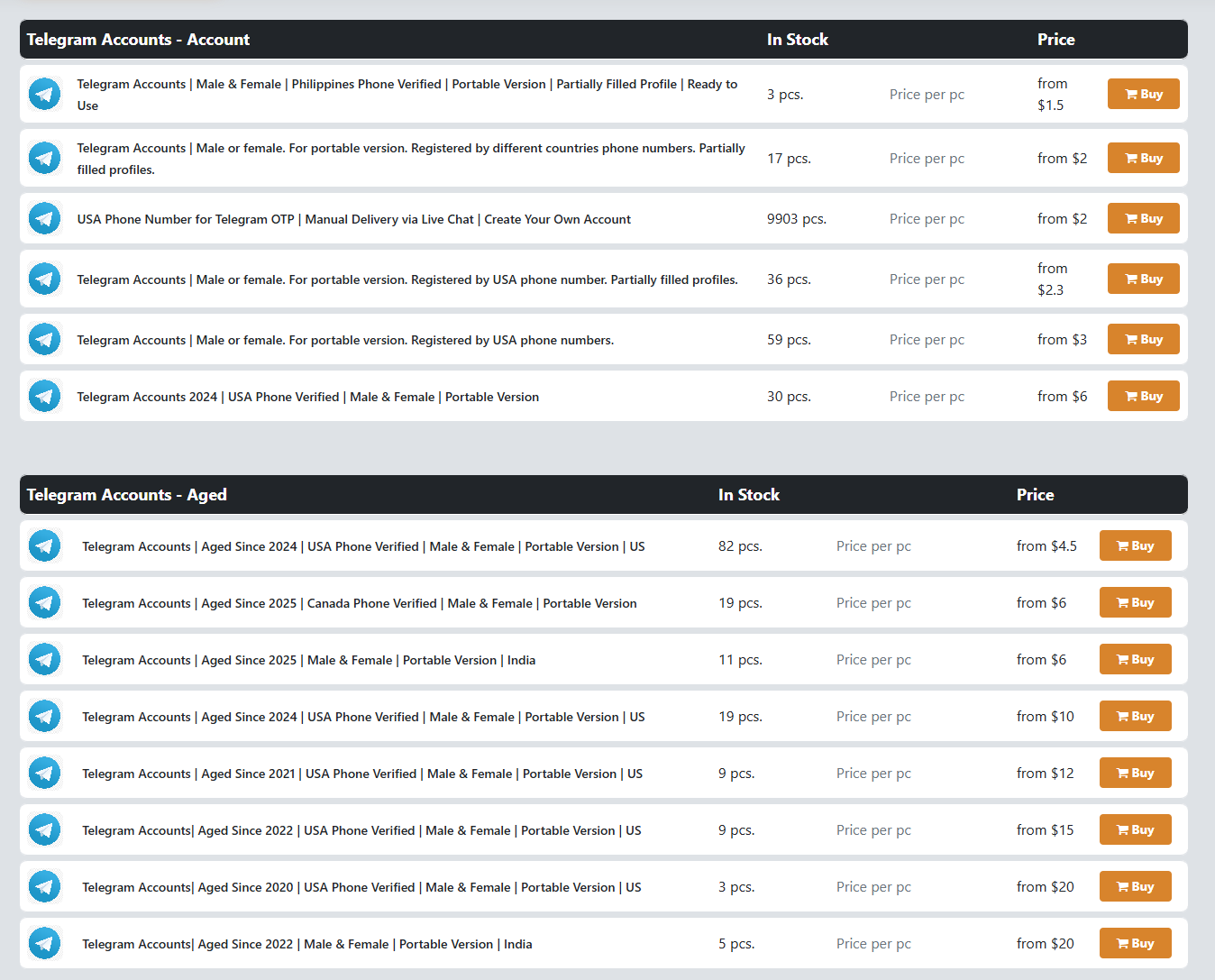
AccsZone's Telegram accounts inventory — standard and aged accounts by country (USA, Canada, India, Philippines) with real-time stock counts and live pricing from $1.50 to $20+.
2. AccsBulk
AccsBulk is the wholesale-focused sister platform to AccsZone, built for high-volume buyers — agencies, resellers, and operators who need 20, 50, 100, or more Telegram accounts at once. It runs on the same automated delivery infrastructure but adds tiered bulk discounts that lower the per-account cost as order size grows.
What stands out: Wholesale bulk packages, the same instant automated delivery (credentials, cookies, and recovery data in your dashboard seconds after payment), and full compatibility with antidetect browsers. AccsBulk provides a First Login Warranty — any account not working on first login is replaced free or refunded. Flexible payment including USDT, BTC, and cards, with 24/7 support.
Best for: Resellers and agencies buying Telegram accounts in volume, and anyone who needs the lowest per-unit price on bulk orders rather than single-unit pricing.
Need volume? Wholesale Telegram accounts with bulk discounts
View Bulk Telegram Accounts on AccsBulk →3. Z2U
Z2U is a large global digital goods marketplace where you can buy Telegram accounts from verified sellers. It offers aged Telegram accounts, PVA (phone verified) accounts, and bulk accounts, with each listing showing account details, pricing, delivery method, and seller ratings. Z2U applies an escrow system and buyer protection to orders.
What stands out: Wide selection across price points, a seller rating system for transparency, and escrow that holds payment until delivery is confirmed. Strong for finding specific account types from many competing sellers.
Watch out for: Z2U is seller-based — you buy from individual sellers, not the platform. Delivery depends on the seller being online, so it is not instant in the way an automated marketplace is. Quality varies between sellers, and Z2U itself notes it does not directly manage or control individual accounts. Z2U has also experienced a past data breach, so account security hygiene matters.
4. G2G
G2G is a large marketplace best known for gaming accounts and in-game currency, with a secondary section covering social media and messaging accounts including Telegram. It runs on a seller-based model with escrow and buyer reviews.
What stands out: Established brand, escrow protection, and a large base of sellers. Familiar to anyone who has bought gaming assets.
Watch out for: G2G is built around contacting individual sellers and waiting for manual delivery. Sellers are frequently offline, so orders can sit unfulfilled for hours. There is no instant delivery and no practical single-transaction bulk ordering. Telegram inventory is thin compared to its gaming catalog, and refunds run through a dispute process that can take days.
5. Swapd
Swapd (swapd.co) is a moderated, forum-style marketplace for premium digital assets and social media accounts, including higher-value Telegram channels and accounts. It is known for strict moderation, quality control, and a strong escrow service that holds funds until both parties confirm the transfer.
What stands out: Heavy moderation and verification produce higher-quality listings and very low scam rates. Excellent for acquiring premium or high-value Telegram channels and established accounts where trust and a clean transfer matter most.
Watch out for: Swapd is built for higher-value individual deals, not bulk or instant purchasing. Transactions are negotiated between buyer and seller and routed through escrow, which takes time. There is no "add quantity, checkout" flow — each deal is a single asset, often expensive. Not practical for operators who need volume or same-minute delivery.
Honorable Mentions
Other platforms appear in Telegram account discussions: Fameswap (peer-to-peer, strong for accounts with followers), AccsMarket (mixed inventory with escrow), PlayerUp (gaming-focused with escrow), and BlackHatWorld and various Telegram groups (forum and private sellers with the lowest prices but the highest scam risk and no buyer protection). All share the seller-based limitations described below.
Platform-Inventory vs. Seller-Based: The Core Difference
Three of the five marketplaces above — Z2U, G2G, and Swapd — along with most honorable mentions, share the same fundamental structure: you buy from an individual seller, not from the platform itself. This model carries consistent limitations no matter how reputable the platform:
- No instant delivery. You contact a seller and wait for them to manually send credentials. If the seller is offline or in another timezone, you wait — sometimes hours, sometimes longer.
- No practical bulk purchasing. Buying 50 accounts means finding a seller who has 50 in stock and coordinating the handoff, rather than a simple add-quantity checkout.
- Limited or inconsistent refunds. Replacement and refund terms are set by individual sellers or run through a slow dispute process. If a seller disappears, recourse can be limited.
- Unpredictable availability. A reliable seller last week may be gone this week. There is no guaranteed, always-on inventory.
Automated, platform-inventory marketplaces like AccsZone and AccsBulk remove these bottlenecks. The platform holds the stock, processes payment automatically, and delivers credentials instantly — 24 hours a day, with no seller in the loop. AccsZone covers single and mixed orders; AccsBulk adds wholesale tiers for volume. For anyone who buys regularly, buys in quantity, or needs accounts on demand, this structural difference is the deciding factor.
Quick Comparison
| Marketplace | Model | Delivery | Bulk Friendly | Refund/Replacement | Best For |
|---|---|---|---|---|---|
| AccsZone | Platform inventory | Instant (automated) | Yes | Instant, before login | Aged & PVA, instant delivery |
| AccsBulk | Platform inventory | Instant (automated) | Yes (wholesale tiers) | First login warranty | Agencies, resellers, volume |
| Z2U | Seller-based | Manual | Limited | Escrow, seller-dependent | Variety, competing sellers |
| G2G | Seller-based | Manual | No | Dispute process (slow) | Gaming-focused, some Telegram |
| Swapd | Seller-based (moderated) | Manual (escrow) | No | Escrow, case-by-case | Premium channels, high-value |
Types of Telegram Accounts You Can Buy
Understanding the account types helps you buy the right ones for your use case.
Fresh PVA (Phone Verified Accounts). Newly created accounts verified with a real phone number. Affordable and useful for operators who plan to age and warm the accounts themselves, or for low-stakes uses. They face Telegram's new-account spam restrictions until they build history.
Aged Telegram accounts. Accounts registered months or years ago. Age is Telegram's strongest trust signal — aged accounts bypass many of the spam limits that cripple new accounts, can join more groups and channels per day, and are less likely to be flagged. These are the standard choice for marketing, community management, and bulk operations.
Accounts with cloud password (2FA). Accounts delivered with the two-step verification password included, giving you full control to secure the account immediately after purchase.
Session + tdata accounts. Some accounts are delivered as a ready-to-import session string or tdata folder, letting you load the account directly into Telegram Portable or an automation tool without a fresh login event.
Accounts by country. Telegram accounts registered with phone numbers from specific regions — USA, Europe, Asia, and others. Country matters for geographic targeting and trust within regional communities.
Bulk accounts. Large quantities of PVA or aged accounts at wholesale pricing, used by agencies, resellers, and high-volume marketers.
What to Look for When Buying Telegram Accounts
Creation method. Accounts created manually on residential IPs with real phone verification last far longer than bot-generated accounts created on datacenter IPs. Ask how accounts are created.
Delivery format. Quality providers deliver complete access: login credentials, the email if applicable, the 2FA cloud password, and ideally the session string or tdata folder. Without the cloud password and recovery details, you cannot fully secure the account.
Account age and spam status. Confirm the registration period and whether the account currently has any spam restrictions or limits. An aged account that is already spam-blocked is worth little.
Replacement policy. Accounts occasionally arrive frozen or limited. A reputable provider replaces dead-on-arrival accounts instantly. Check the claim window and whether replacement is automatic or requires a slow dispute.
Delivery speed. Automated dashboard delivery beats manual seller handoffs, especially at scale or odd hours.
What to Do After You Buy a Telegram Account
- Set up isolation. Run the account in its own Telegram Portable instance (or antidetect browser profile) with a dedicated residential or mobile proxy matching the account's country.
- Import session or log in. If you received a session string or tdata, import it to resume the existing session and avoid a new-device login flag. Otherwise log in with the provided credentials.
- Verify and secure. Confirm the account is active and not limited. Then change the cloud password (2FA) to one you control and update the recovery email if provided.
- Warm before scaling. Even aged accounts benefit from a few days of light, natural activity — join a few groups, read channels, send a few messages — before high-volume use. Sudden bulk activity from a newly active account triggers limits.
- Respect Telegram's limits. Avoid mass-messaging strangers, joining dozens of groups in minutes, or adding many contacts rapidly. Gradual usage keeps accounts alive.
Is It Legal and Safe to Buy Telegram Accounts?
Buying and selling Telegram accounts violates Telegram's Terms of Service, but violating a platform's ToS is not the same as breaking the law — it is a contractual matter between the user and Telegram. The practical risk is that Telegram may limit or ban an account if it detects an ownership change or suspicious activity.
You minimize that risk by buying quality accounts (manually created, properly verified), securing them immediately after purchase (changing the cloud password), running them through proper isolation (dedicated proxy, separate instance), and using them gradually rather than aggressively. No method eliminates risk entirely, which is why a provider with an instant replacement policy matters — it protects you against accounts that fail on arrival.
Frequently Asked Questions
Can I run more than three Telegram accounts on one computer?
Yes. The standard Telegram Desktop app limits you to three accounts per instance, but Telegram Portable bypasses this. By extracting a separate copy of the portable build into its own folder, each instance runs independently with its own data and login. You can run as many portable instances as your computer's resources allow. Assign each instance its own proxy to keep the accounts from being linked by IP.
What is Telegram Portable and is it safe to download?
Telegram Portable is the official portable build of Telegram Desktop that runs without installation — no registry changes, no installer. It is free and open source under the GPLv3 license and has the same features as the installed version. Download it only from the official Telegram website or a trusted repository to avoid tampered builds. It is safe when sourced correctly.
Where is the best place to buy Telegram accounts?
For instant delivery and reliability, platform-inventory marketplaces like AccsZone (single and mixed orders) and AccsBulk (wholesale volume) deliver credentials automatically within seconds, 24/7, with instant replacement on dead accounts. Seller-based marketplaces like Z2U, G2G, and Swapd offer variety and escrow but depend on individual sellers being online for manual delivery. The best choice depends on whether you prioritize speed and bulk (automated platforms) or premium individual deals (moderated platforms like Swapd).
How much do Telegram accounts cost?
Prices vary by type and quality. Fresh PVA accounts are the cheapest, often under a dollar each. Aged accounts cost more depending on registration year and country. Accounts with established channels, members, or premium history can cost significantly more on moderated marketplaces like Swapd. Bulk orders reduce the per-account cost through wholesale tiers.
Why do Telegram accounts get banned or limited after purchase?
The most common causes are: running multiple accounts from the same IP without dedicated proxies, aggressive activity immediately after purchase (mass messaging, rapid group joins), logging in from a flagged datacenter IP or VPN, and skipping the warm-up period. Securing the account, using a dedicated residential proxy, and ramping activity gradually dramatically reduces the risk of limits.
Do I need a proxy for each Telegram account?
Yes, if you are running multiple accounts. Telegram tracks IP addresses, so logging several accounts in from the same IP links them and risks a chain ban. Assign each account its own dedicated residential or mobile proxy, ideally matching the account's registration country. Configure the proxy inside each Telegram instance under Settings → Advanced → Connection type.
Is buying Telegram accounts legal?
Buying Telegram accounts violates Telegram's Terms of Service but is not itself illegal — it is a contractual matter between users and Telegram. The practical consequence is that Telegram may limit or reclaim an account if it detects an ownership change. Buying quality accounts, securing them immediately, and using them responsibly minimizes this risk.