Telegram SMS Code Not Received? Complete Fix Guide (2026)
Last reviewed: August 2026 · Applies to Telegram on Android, iOS, Desktop and Web
A Telegram login code that never arrives is almost always a delivery problem, not an account problem. The number is fine, the account is fine, and the code was probably generated. It simply went somewhere you are not looking. This guide explains where codes actually go, why certain setups never receive them, and what to do in each case.
What this covers
- How Telegram decides where to send your code
- First checks, in order
- The most common cause: the code went in-app
- Why emulators and virtual devices rarely work
- Why desktop and web signups fail
- Device-specific fixes: Android, iPhone, Samsung
- Voice call, email and other delivery methods
- If you do not have a usable phone number
- When a number service is not the right tool
- Frequently asked questions
How Telegram decides where to send your code
Before troubleshooting, it helps to understand the routing logic, because almost every failure case follows from it.
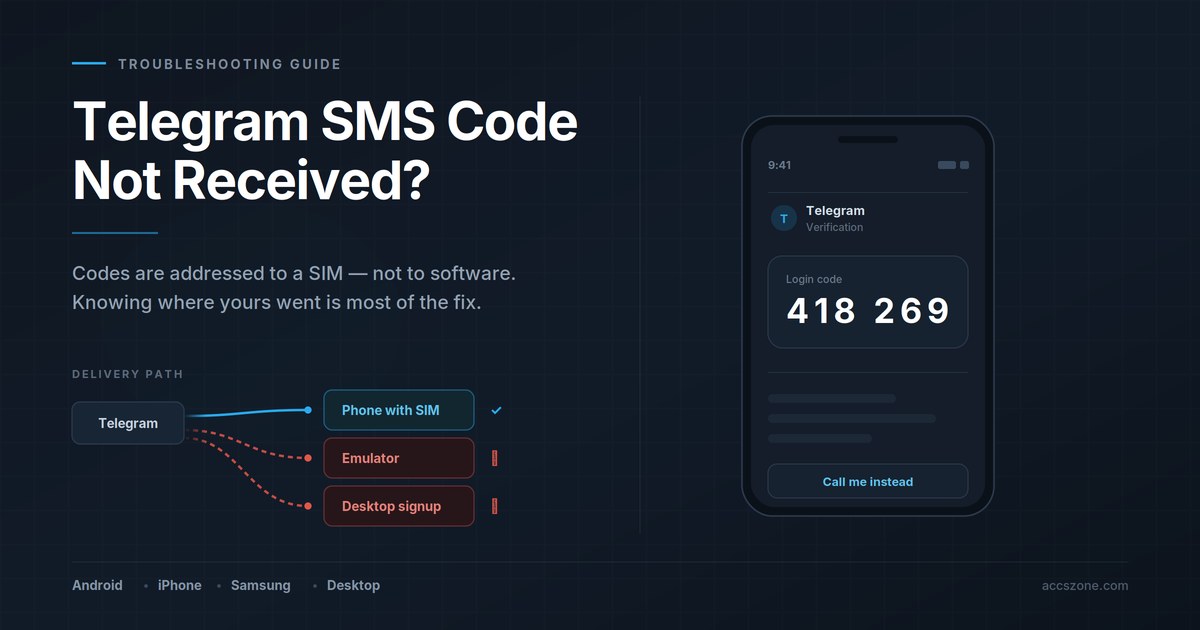
When you enter a phone number on a Telegram login screen, Telegram checks whether that number already has an active session somewhere. What happens next depends on the answer:
| Situation | Where the code is delivered |
|---|---|
| Number is already logged in on another device | Inside the Telegram app on that device, as a message from the official Telegram service chat. No SMS is sent. |
| Number has never been registered | By SMS to the mobile network, addressed to the SIM. |
| SMS fails or the resend timer expires | A voice call option appears, reading the digits aloud. |
| Account has a linked email and login email is enabled | To the linked email address. |
The single most important consequence: an SMS is addressed to a phone number on a cellular network. It is delivered to whatever hardware holds that SIM. Software running on a computer has no way to intercept it.
This is why the same number can work perfectly on a phone and never receive anything on a desktop or emulator. Nothing is broken. The message is arriving somewhere else.
First checks, in order
Work through these before anything more involved. Each takes under a minute and together they resolve a large share of cases.
- Confirm the country code and number. A missing or wrong country code is the most frequent single mistake. Enter the number in full international format without a leading zero after the country code.
- Check your SMS spam or blocked folder. Telegram codes arrive from a shortcode rather than a normal number, and filters sometimes classify these as spam. On Android, check Messages → Spam & blocked. On iPhone, check Messages → Filters → Unknown Senders.
- Confirm the SIM has signal and can receive normal SMS. Ask someone to text you. If ordinary messages are not arriving either, the problem is with the line, not with Telegram.
- Check whether the number is already active on another device. Look at any other phone or tablet where you use Telegram. If the number is logged in there, the code is waiting in the Telegram service chat, not in SMS.
- Wait for the timer instead of resending. Each additional request extends the cooldown. Repeatedly pressing resend makes the wait longer, not shorter.
On repeated attempts: Telegram applies escalating rate limits per number. After several failed requests in a short period, the cooldown can extend from minutes to hours. If you have already tried many times, the most effective next step is to stop for a few hours and try once afterwards.
The most common cause: the code went in-app
This accounts for more reports than every other cause combined, and it surprises people because they are watching their SMS inbox.
If your number has an active Telegram session anywhere — an old phone in a drawer, a tablet, a second handset, Telegram Desktop on a computer you have forgotten about — Telegram treats that session as proof you already control the number. Instead of paying to send an SMS, it delivers the code as a message inside the app.
Where to look
Open Telegram on the device that already has the account. Find the chat named Telegram, marked with a blue verified checkmark. The login code is in there, usually as the most recent message.
If you no longer have access to that device
Wait for the SMS resend timer to count down fully. Once it expires, Telegram offers a voice call as an alternative. That call reaches the SIM regardless of what other sessions exist, which makes it the reliable path when the in-app route is unreachable.
Never share a login code. Anyone who obtains it can sign in as you. Telegram staff will not ask for it, and no legitimate support process requires it. A message asking you to forward a code is an attempt to take the account.
Why emulators and virtual devices rarely work
People frequently try to register Telegram inside LDPlayer, BlueStacks, NoxPlayer, MEmu, or a cloud phone service, and find that no code ever arrives. The reason is structural rather than a bug or a setting.
The mechanism
An emulator is Android software running on a computer. It has:
- No cellular modem
- No SIM card slot
- No connection to any mobile network
An SMS travels over the mobile network to the SIM associated with the number. Since the emulator has neither, there is nothing for the message to arrive at. The code may well have been sent successfully — it simply went to whatever physical hardware holds that SIM, or, if the number came from an online service, to that service's dashboard.
A second problem with emulators. Beyond SMS delivery, emulated environments expose device characteristics that differ noticeably from real handsets — build fingerprints, sensor availability, GPU signatures. Registrations from these environments face additional friction, and accounts created this way are more likely to encounter restrictions later. Even when a code is obtained by other means, the underlying environment can remain a problem.
What works instead
- Register on a real handset first. Complete the initial signup on a physical Android phone or iPhone with the SIM inserted. Once the account exists, you can link Telegram Desktop, Web, or another client afterwards — those later logins can be authorised from the phone directly.
- Use a device with the SIM present. If the number belongs to a physical SIM, the code goes to that SIM. Read it there.
- If the number came from an online service, read the code in that service's web dashboard rather than expecting it on the device.
The practical rule: use your own Android phone or iPhone for the first registration. It is the only setup where the code path is guaranteed to work, and it produces a cleaner account than any emulated alternative.
Why desktop and web signups fail
Telegram Desktop and Telegram Web are built as companion clients. They assume an account already exists and that you are adding another device to it.
When you enter a number that has never been registered:
- There is no existing session for Telegram to send an in-app code to
- The desktop client cannot receive SMS, because it is not connected to a mobile network
- The code is dispatched to the SIM, which is in a phone somewhere else
The result looks like a bug — a code was requested, nothing appeared — but the message went where it was addressed.
The correct sequence
- Install Telegram on the phone holding the SIM.
- Register the number there and complete verification with the SMS or voice code.
- Open Telegram Desktop or Web and choose to log in.
- Either scan the QR code with the phone, or accept the code that now arrives inside the app on the phone.
Once the account exists, adding further clients is straightforward. The difficulty is confined to that first registration.
Device-specific fixes
Android
- Open Messages → Spam & blocked and check whether the code was filtered.
- In Settings → Apps → Messages → Notifications, confirm notifications are enabled so new messages are not silently arriving.
- If you use a dual-SIM phone, check that the SIM matching the number is active and set for the relevant slot.
- Toggle airplane mode on for ten seconds and off again to force a fresh network registration.
- If a third-party SMS app is installed, open the stock Messages app as well — codes sometimes appear in one and not the other.
iPhone
- Open Messages → Filters → Unknown Senders. Codes from shortcodes are routinely sorted there.
- Check Settings → Messages → Blocked Contacts for a blocked shortcode.
- Confirm Settings → Focus is not suppressing message notifications.
- If the device uses an eSIM, verify in Settings → Cellular that the correct line is enabled and designated for SMS.
Samsung
Samsung devices add a filtering layer beyond stock Android that catches shortcode messages more aggressively:
- Open Messages → ⋮ → Settings → Block numbers and spam → Block spam messages and review what has been caught.
- Check Settings → Apps → Messages → Storage; a full message store can prevent new messages from being written.
- On some carrier-branded firmware, an additional carrier spam filter runs server-side. If nothing local explains it, the carrier may be filtering the shortcode.
When the carrier is filtering
Some networks block international shortcodes by default, particularly on prepaid plans. If ordinary SMS arrive normally but verification codes never do, contact the carrier and ask whether A2P (application-to-person) messaging is enabled on the line. This is a common restriction on newly activated prepaid SIMs.
Voice call, email and other delivery methods
Voice call
The most reliable fallback. Wait for the SMS resend timer to expire completely, and a Call me option appears. Telegram places an automated call that reads the digits aloud, usually twice.
This works when SMS does not because voice calls are not subject to shortcode filtering, and they reach the SIM directly. Answer promptly — the call does not wait long, and a missed call may consume the attempt.
Email login code
Where an email address has been linked to the account and login email is enabled, Telegram can send the code there instead. This must be configured in advance, under Settings → Privacy and Security, so it is a preventive step rather than a fix for an account you are locked out of today.
QR code login
For adding desktop or web clients to an account that already exists, QR login avoids codes entirely. Choose Log in by QR code on desktop, then on the phone go to Settings → Devices → Link Desktop Device and scan. No SMS is involved.
If you do not have a usable phone number
Some situations do not have a device-side fix. You may be operating in a country where local SIMs are unavailable to you, need a number in a different region, or need separate numbers for accounts that must stay independent of your personal line.
Online number services provide a phone number and display incoming SMS in a web dashboard. Because the message is shown in a browser, this also solves the emulator problem — you are no longer waiting for a message to reach hardware that cannot receive it.
How these services differ
| Service | Model | Typically suited to |
|---|---|---|
| TextVerified | US numbers, per-verification and rental options | US-based registrations where a longer-term number may be needed |
| SMSPool | Pay-per-use, broad country coverage | One-off verifications across varied regions |
| SMSPin | Pay-per-use, service-specific pricing | Single verifications where cost per code matters |
| BloomSMS | Pay-per-use with rental options | Situations needing the same number available again later |
What to check before choosing
- Whether Telegram is explicitly supported. Services list supported destinations separately. A number that receives codes for one platform may not receive them for another.
- Rental versus one-time. A one-time number receives a single code and is then released. If you will ever need to log in again from a new device, that number is gone — and with it, recovery. Rentals cost more but keep the number available.
- Country of the number. Some numbers are recycled heavily and carry a history of prior registrations, which can affect how the account is treated.
- Refund policy for undelivered codes. Not every request succeeds. Reasonable services refund automatically when no code arrives.
The recovery problem is worth thinking about now, not later. Telegram uses the phone number as the recovery mechanism. With a one-time number that has since been released, you cannot recover the account if you are logged out. Enable two-step verification with a password immediately after registering, and store that password somewhere durable. Without it, a released number means a permanently inaccessible account.
When a number service is not the right tool
Number services solve one specific problem: getting a code to a number you can read. There are situations where that is not actually what is needed.
If you need several accounts, each on a distinct number, the sequence of obtaining a number, registering, waiting for a code, setting a password and repeating becomes the bottleneck — and each step is a place where a code can fail to arrive. There is also the recovery issue above, multiplied by however many accounts are involved.
For that situation, accounts that are already registered and verified are an alternative. Instead of managing the verification process yourself, you receive credentials for an account that has already completed it. Marketplaces such as AccsZone supply registered Telegram accounts with the associated access details, which removes the verification step entirely.
This suits a narrow set of cases — bulk requirements, regional numbers that are difficult to obtain, or workflows where the setup time matters more than the cost. For a single personal account, a SIM in your own phone remains simpler and cheaper than anything else described here.
Whichever route you take: enable two-step verification straight away, under Settings → Privacy and Security → Two-Step Verification. It is the one measure that keeps an account recoverable when the number behind it is no longer reachable.
Frequently asked questions
Why am I not getting the SMS code from Telegram?
Most often the number is already registered on another device, so the code was delivered inside the Telegram app there rather than by SMS. The other frequent causes are that the SIM is not in the device requesting the code, or that the carrier has filtered the shortcode. Checking any other device where you use Telegram resolves the majority of cases.
How long does it take for Telegram to send a verification code?
Normally 30 to 60 seconds. If nothing arrives within two minutes, resending immediately will not help — each attempt lengthens the cooldown. Wait for the timer to expire and request a voice call instead.
How do I verify Telegram without SMS?
Three alternatives exist. If the number is active on another device, the code arrives in the Telegram app there. After the SMS timer expires, a voice call reads the code aloud. And where an email has been linked in advance, Telegram can send login codes to it.
What is the 6 digit code in Telegram?
A one-time login code confirming control of a phone number. It expires after a short window and works once. Telegram will never ask anyone to share it, and no support process requires it.
Why did I receive a Telegram code I did not request?
Someone entered your number on a login screen — often a mistyped digit in their own number, occasionally a deliberate attempt. The code by itself grants no access. Do not share it, and enable two-step verification so a code alone is never sufficient.
Can I receive a Telegram code on LDPlayer or BlueStacks?
Generally no. Emulators have no cellular modem and no SIM, so an SMS addressed to a mobile number cannot reach them. Read the code on the device holding the SIM, or use a number service that displays messages in a web dashboard.
Why does Telegram not send a code when I sign up on desktop?
Telegram Desktop and Web are companion clients for accounts that already exist. For a number that has never been registered, Telegram expects the first login on a mobile device holding the SIM. Register on the phone first, then link desktop.
Does using a VPN stop the code arriving?
A VPN affects the internet connection, not SMS delivery, so it does not prevent a text from reaching the SIM. It can occasionally cause the request itself to fail if the exit node is heavily used. If a request is not going through, disabling the VPN for the verification step and re-enabling it afterwards is worth trying.
I have tried many times and now nothing happens at all.
Repeated requests trigger escalating rate limits on the number, extending the cooldown from minutes to hours. There is no way to shorten it. Stop requesting, wait several hours, then make a single attempt — preferably choosing the voice call option.