Buy WhatsApp accounts where every listing title states what you get: the number's country (mixed, USA, Canada, Germany or UK), that the email is included, that no two-step verification is enabled and that you log in with the verification code sent to that email. The UK listings add a 30-, 60- or 90-day long-life number with a backup API; one USA listing is an OTP number delivered manually on the live chat. Prices and stock are live. Pay in crypto and in-stock accounts appear in your dashboard automatically; accounts that fail before your first login are covered by the 24-hour replacement policy.
WhatsApp accounts for sale: what the one account type covers
All WhatsApp listings on AccsZone sit in a single sub-category. Open it, then compare the listings by country code, login method and number lifetime; the listing title is the specification, and the listing page shows the exact line format for that product.
WhatsApp accounts (all countries)
Ready-to-use WhatsApp accounts from mixed countries, Canada (+1), the USA (+1) and Germany (+49), each with the email included, no two-step verification enabled and login by the verification code sent to that email; the USA and Germany listings are marked premium quality. The UK (+44) listings are described in their titles as real physical SIM accounts, pre-registered, with email-link TAC login and a 30-, 60- or 90-day long-life number backup API. One USA listing is not an account but a phone number for WhatsApp OTP, delivered manually on the live chat so you create the account yourself.
Delivery is automatic for the account listings: as soon as your crypto payment confirms and the order is placed, the credentials are released to your AccsZone dashboard. Open My Orders, click View and download the file. The exception is the USA Phone Number for WhatsApp OTP listing, whose title states manual delivery via live chat: after paying you open the chat, receive the number, request the code in WhatsApp and the agent passes the code to you.
Account format
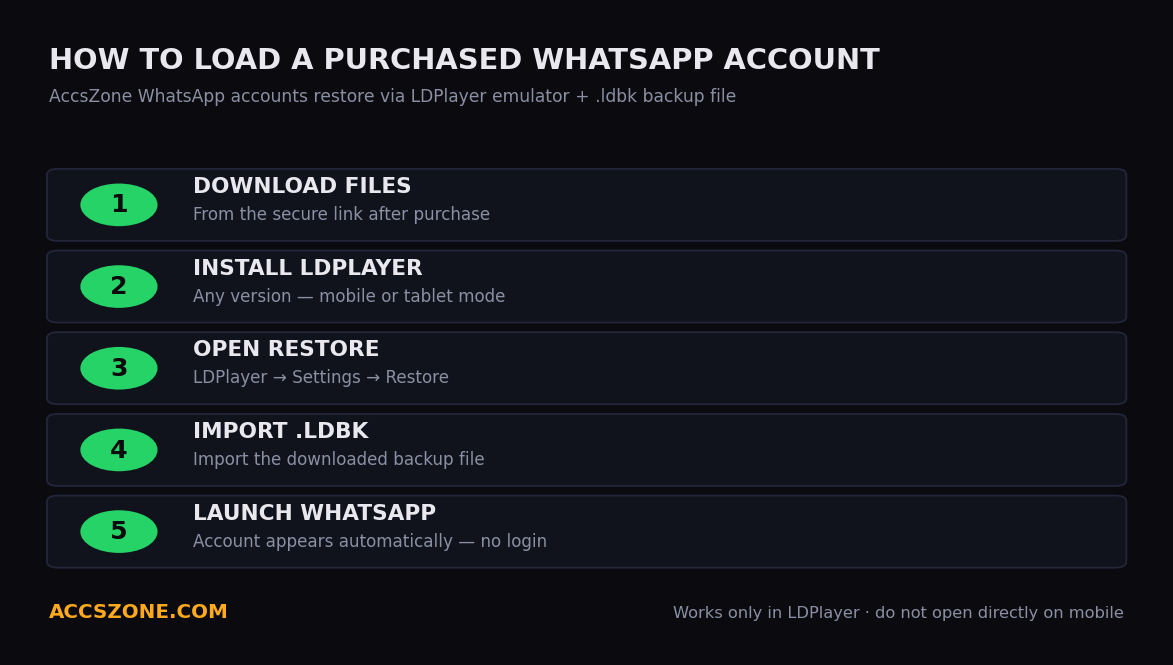
The WhatsApp help article states the account format as Phone Number | Session File | Device Info, delivered as a .zip (session files plus device info), and names GBWhatsApp or WhatsApp Business on Android as the recommended app for loading a session. The listing titles currently on this page describe the login differently: the email is included and you sign in with the verification code sent to that email (the UK listings call it email-link TAC login and add a number backup API link). Number country, profile setup and account age vary by listing — read the title, and check the exact line format shown on the listing page before ordering. No two-step verification PIN is set on these accounts, so there is no 2FA key to receive.
How to log in
Download your file from My Orders and keep it: the number, the email login and, on the UK listings, the API links are all in it. Check the details immediately after delivery, while the 24-hour window is open.
Connect a residential or mobile proxy — or a SIM — from the number's country before you open WhatsApp: a UK (+44) number needs a UK IP, a Germany (+49) number a German IP; the listing title names the country. Mobile proxies are sold on AccsZone. The help article states that a mismatched location flags the account and voids replacement eligibility.
Load the account the way its listing states. For an email-code listing, enter the phone number in WhatsApp, request the code, open the included mailbox (or the email API link on the UK listings) and type the six-digit code; the listing page describes this step by step. For a session-file delivery as described in the help article, install a portable WhatsApp version (GBWhatsApp or WhatsApp Business on Android), copy the session folder to the app's directory and open it — the article says not to load session files in the official WhatsApp app.
Warm up for one to two days. Send one or two normal messages, check existing chats and change the profile photo slowly; the help article says to avoid bulk messaging for the first 48 hours.
Secure the account once it is stable. Enable WhatsApp two-step verification with a PIN you control, update the profile name, photo and about text gradually, and wait at least 24 hours after first use before linking WhatsApp Web. Keep the UK number backup API link saved — the titles state it is valid for 30, 60 or 90 days for re-verification codes.
Replacement policy in plain words
Covered. An account that is dead on arrival (the session does not load or the login details do not work), or the wrong account type or number country — for example a mixed-country account instead of the Germany listing — is replaced or refunded.
The window. Report it within 24 hours of purchase; reports after that are not eligible.
Refund form. Store credit on your AccsZone balance.
Not covered. An account banned after you loaded a session file in the official WhatsApp app against the help article's instruction, banned after bulk or spam messaging, used without a matching proxy, or reported after 24 hours. For the OTP-number listing the title and listing page state that the service is complete once the code has been delivered.
How to claim. Go to My Orders, open a support ticket on the order with the order ID and a screenshot of the error; the help article says the team responds within 24 hours. Do not keep retrying the login while the claim is open.
Payment is by cryptocurrency — Bitcoin, USDT, Ethereum, Litecoin and other major coins — through your account balance; once the network confirms the deposit (typically 10–30 minutes) the order is delivered automatically. Card payments are not accepted. Orders of 500+ accounts receive a 5 % discount and orders of 2,000+ accounts a 10 % discount, applied automatically per product.
Support runs 24/7 on the live chat at accszone.com — it is also where the manual OTP-number listing is fulfilled; Telegram @accszone1 handles custom bulk orders and API access, and resellers can integrate through the AccsZone API.
Frequently asked questions
Where can I buy WhatsApp accounts?
On this page. Open the WhatsApp accounts sub-category, pick the listing whose title matches the country and login method you need — mixed countries, Canada, USA, Germany or a UK long-life number — set the quantity and pay from your crypto balance. The account appears in your dashboard automatically when the payment confirms.
Is it legal to buy WhatsApp accounts?
WhatsApp's Terms of Service require you to register with your own current mobile phone number and prohibit selling, reselling or renting its services, so a purchased account breaches those terms and WhatsApp can suspend or disable it at any time. Whether buying one is lawful for you depends on your country and on what you use it for; this is not legal advice. AccsZone's Terms & Conditions prohibit using any account for illegal activity, spam or circumventing platform policies.
How much does a WhatsApp account cost?
Prices are shown live on every listing and change with the number's country, with the number lifetime stated in the UK titles (30, 60 or 90 days) and with whether the listing is a ready account with the email included or a manually delivered OTP number. Compare the listings inside the sub-category; the title tells you which specification the price belongs to.
Which countries are available?
Mixed countries, Canada (+1), USA (+1), Germany (+49) and the United Kingdom (+44), as the listing titles state. The country is the number's country code; it does not change after purchase, so choose the listing for the market you will message in and use a proxy from that country.
What is the difference between a WhatsApp account and a WhatsApp OTP number?
An account listing delivers a registered WhatsApp number with its login details (email included) so you sign in to an existing account. The USA Phone Number for WhatsApp OTP listing delivers only a +1 number and the one-time verification code, manually on the live chat, so you create your own account with it; its title says so, and the listing page states that the service is complete once the code has been delivered.
What does "long-life number" and "number backup API" mean on the UK listings?
The UK (+44) titles state a 30-, 60- or 90-day long-life number with a number backup API: the physical SIM number stays reachable for that period and the API link returns verification codes if WhatsApp asks you to re-verify within it. The accounts are pre-registered and, per the titles, log in by email-link TAC. Keep the API link from your delivery file saved for the full period.
Do the accounts have two-step verification (2FA) enabled?
No. Every account title states no 2FA, and the listing pages confirm that no two-step verification PIN is set; you log in with the verification code sent to the included email. After the account is stable you can enable two-step verification yourself with a PIN you control.
How fast is delivery?
Automatic for the account listings: in-stock accounts are released to your dashboard as soon as the crypto payment confirms and the order is placed; confirmations usually take 10–30 minutes. The USA OTP-number listing is delivered manually on the live chat, so you must be online during the process.
What if the account does not work?
If the session does not load or the login details fail, or the wrong type or country was delivered, report it within 24 hours of purchase from My Orders with your order ID and a screenshot and it will be replaced or refunded as store credit. Problems after you have logged in — bulk messaging, no matching proxy, loading a session file in the official app — are not covered. Full table in the WhatsApp help article.
Can I buy WhatsApp accounts in bulk?
Yes. Set the quantity on the listing; stock is shown live and differs between countries, so check the count before planning a large order. Orders of 500+ accounts receive a 5 % discount and orders of 2,000+ accounts a 10 % discount, applied automatically per product. Resellers can automate ordering through the AccsZone API; custom volumes can be arranged on Telegram at @accszone1.