
Listing Guidelines
- 1Ask the supplier support team for the full tutorial video on how to create a listing and make a product live.
- 2Make sure to provide the correct credentials for each and every account. Otherwise, our customer support team will issue a refund for that account.
- 3Keep in mind that the decision of our customer support team is the final decision about a product. We cannot give any further explanation.
- 4Do not add any logo by yourself.
Listing Fields — Fill In Correctly
Important
Write every field below correctly; otherwise, your listing will not be approved.
- Add a description with full details of your product, the login domain link for the emails you provide, and any other additional info needed to fully access the account.
- Do not add any personal info or suspicious links in the description.
- Also state the account format in the description.
Product Title
An ideal product title describes the product in a fixed order, with each detail separated by a pipe ( | ). Start with the type of product, then the age of the account, and then complete the rest in this order:
- Product type — e.g. IG Accounts, FB Accounts, Gmail Accounts
- Age — when the accounts were created, e.g. Aged Since 2024
- Size / strength — e.g. 25000 Followers, number of friends, or similar
- Email — whether the original mail is included and which provider, e.g. Original mail Included (hotmail/outlook.com)
- Security — e.g. 2FA Enabled
- Profile status — e.g. Partially Completed Profiles or Fully Completed Profiles
- Registration country — e.g. Registered via USA IPs, UK IPs, Italy IPs, or Mix IPs
Example of an ideal title:
IG Accounts | Aged Since 2024 | 25000 Followers | Original mail Included (hotmail/outlook.com) | 2FA Enabled | Partially Completed Profiles | Registered via USA IPs
Short Key
A short key is a brief code that identifies your product at a glance. You can choose it as you like — for example: 1, 2, 3, 4, 5, 6, 7, 8, 9.
Main Category
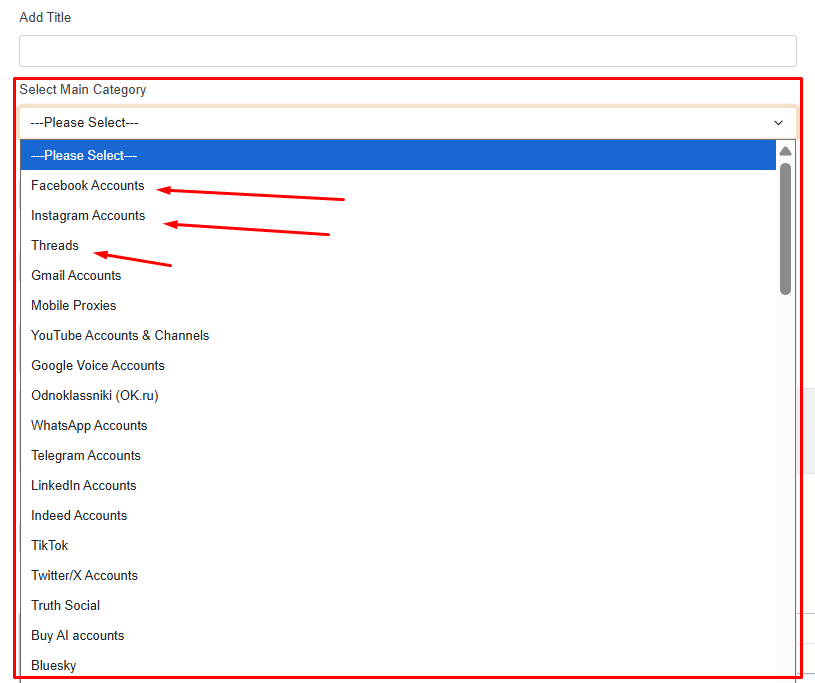
As the screenshot shows, you have to select the main category of your product from the drop-down list — for example Facebook Accounts, Instagram Accounts or Threads. Choose the category that matches your product exactly.
Sub-category
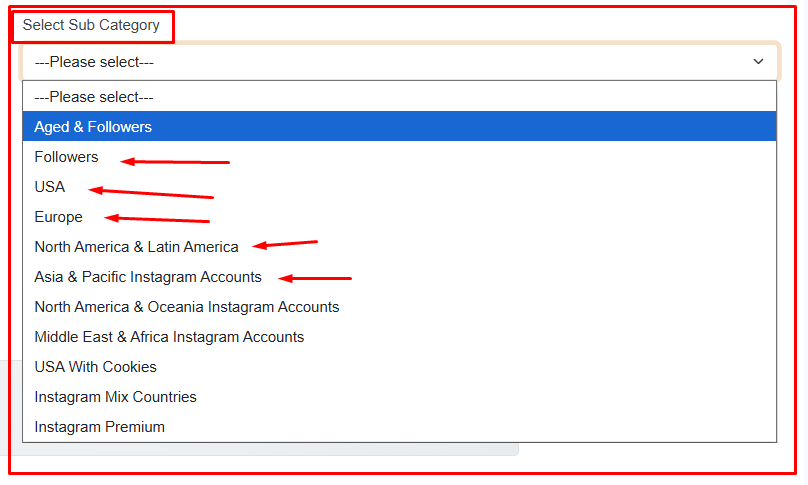
After selecting the main category, choose the sub-category that best describes your product. The sub-category list changes depending on the main category — for example, under Instagram Accounts you can choose Aged & Followers, Followers, USA, Europe, North America & Latin America, Asia & Pacific, and so on. Pick the one that matches your product exactly.
Tip — Generate meta title, meta keywords, meta description & slug with AI
For the Meta Title, Meta Keywords, Meta Description and Slug, you can use any AI chat assistant (such as Claude, ChatGPT or DeepSeek). Paste your product title and run this prompt:
This is my product listing. Give me a slug, a meta title (not more than 60 letters), meta keywords and a meta description.
Copy the results into the matching fields. Replace the example title with your own product title.
Meta Title — not more than 60 letters
Example:
Buy IG Accounts | 25K Followers | Aged 2024 | USA IP | 2FA
Meta Keywords
Example:
Instagram accounts for sale, buy aged IG accounts, 2024 aged Instagram accounts, Instagram accounts 25000 followers, high follower Instagram accounts, original email Instagram accounts, Hotmail Outlook included IG, 2FA Instagram accounts, partially completed profile IG, USA IP Instagram accounts, social media accounts for sale, aged Instagram accounts
Meta Description
Example:
Aged since 2024 Instagram accounts with 25,000 followers. Original Hotmail/Outlook email included, 2FA enabled, partially completed profiles. USA IP registered.
Slug (optional — leave empty for auto generation)
Example:
aged-instagram-accounts-2024-25k-followers-usa
Description of Listing
What to include
The description is what the buyer reads before purchasing, so write it clearly and completely. Include full details of your product, the login domain link for the emails you provide, the account format, login steps, and any other information needed to fully access the account. Do not add any personal info or suspicious links.
Example — Full description of a listing
IG Accounts | Aged Since 2024 | 25,000 Followers | Original Mail Included (Hotmail/Outlook.com) | 2FA Enabled | Cookies Added | Partially Completed Profiles | Registered via USA IPs
Get IG accounts aged since 2024, built for reliability and massive social proof. Each account comes with 25,000 followers for significant credibility, includes the original email (Hotmail/Outlook.com) for full control, has 2FA enabled for enhanced security, cookies added for seamless login, features partially completed profiles for a natural and authentic appearance, and is registered from USA IPs for a clean US footprint.
These accounts are perfect for social media marketing, branding, influencer campaigns, promotions, and more.
Account Format
Username : Insta Pass : Mail : Mail Pass : Insta 2FA : Cookies (Base64)
How to Login (Simple 2-Step Process)
Step 1: Access the App
- Open the app or go to the website
- Enter your Username and password
- You'll be prompted for a 2FA code
Step 2: Generate the 2FA Code
- Visit https://2fagen.com/
- Paste your 2FA Secret Key (example: 5jfmiek6356dgxxuiilufp5tcojjgvkf)
- Click Submit or Generate
- Copy the 6-digit OTP code
- Enter the OTP on the login page
- You're successfully logged in
How to Use Your Cookies (Base64)
Decode:
- Copy the Base64 string
- Open https://www.base64decode.org/
- Paste it → click Decode → get your original JSON cookie data
Import Cookies:
- Install a cookie editor extension (such as EditThisCookie or Cookie-Editor)
- Go to the website
- Open the cookie editor extension
- Delete all existing cookies
- Click "Import" and paste your decoded JSON cookie data
- Save and refresh the page
- You're successfully logged in
Encode (for storage or sharing):
- Copy your JSON cookie data
- Go to https://www.base64encode.org/
- Paste JSON → click Encode → copy the Base64 result
Key Features
- Aged Since 2024 – Established and trustworthy
- 25,000 Followers – Massive social proof and credibility
- Original Mail Included (Hotmail/Outlook.com) – Full email access for password recovery and account management
- 2FA Enabled – Enhanced security for your account
- Cookies Added (Base64) – For seamless login and account stability
- Partially Completed Profiles – Natural and authentic appearance for reduced flagging risks
- USA IP Registered – Clean US footprint for stable operation
- Instant Delivery – Account details delivered instantly after purchase
- 24/7 Support – Our team is available around the clock
Why Choose Our IG Accounts?
Get 2024-aged IG accounts with 25,000 followers, original Hotmail/Outlook email access, 2FA security, Base64 cookies, partially completed profiles, and a clean USA IP footprint. Perfect for influencers, marketers, agencies, and brands ready to promote and grow immediately.
Required Upload Format
Use colons ( : ) as separators
Our website requires accounts to be uploaded in the following format, using colons (:) as separators:
Login : Pass : Email : Email Pass : 2FA : Cookie (Base64 format)
Please do not use the pipe symbol ( | ), quotes ( ' " ), semicolon ( ; ), backslash ( \ ) or spaces as separators. Kindly ensure all uploads follow the correct format.
Recovery Email Policy
Personal & custom domains not accepted
Please be advised that we do not accept any listings where accounts use recovery emails registered under personal, private, or custom web domains (e.g., [email protected]).
Requirements & Guidelines
- Prohibited: Any recovery email hosted on a private domain, personal server, or unverified custom mail provider.
- Reason: Custom and personal domains carry high risks of access loss, domain expiration, or backend recovery manipulation, which leads to delivery issues and buyer disputes.
- Accepted Providers: Recovery emails must be from established, trusted public email providers only (such as Outlook, Hotmail, Gmail, Mail.ru, Rambler, Yahoo, etc.).
Action
Any pending or newly submitted listing containing personal domain recovery emails will be rejected or kept on pending status immediately. Please update your stock with authorized mail services before submitting.
Our supplier support team is available 24/7 on Telegram (@AccsSupplyTeam).